
Most teams don’t leave HubSpot because the CRM is bad. They leave because of how it’s priced and packaged. On Capterra, 35% of the 884 reviews that mention HubSpot CRM’s pricing are negative. For Marketing Hub, that rises to 46% of 1,244.
We wanted to know exactly what people miss when they start searching for a “HubSpot alternative.” So we studied the pricing and help pages of HubSpot and its competitors, read thousands of G2 reviews and collected survey answers from more than 240 CRM users. The result is a list of the 25 features buyers look for, each backed by the sources it came from.
We have already collected more than 240 answers, and the survey stays open: add yours in the form below before you read our analysis. The results in this article are based on the first 240 answers, and we update them as new ones come in.
Before you read: pick the features that matter to you
More than 240 CRM users have already answered, and we keep collecting. Which CRM features matter most to you? The form below lists 25 of them. Pick up to five, then choose the one you would keep if you could keep only one. Please answer before you read our analysis, so our arguments don’t sway your answers. It takes about 3 minutes, and the survey is anonymous.
What the first 240 CRM users told us
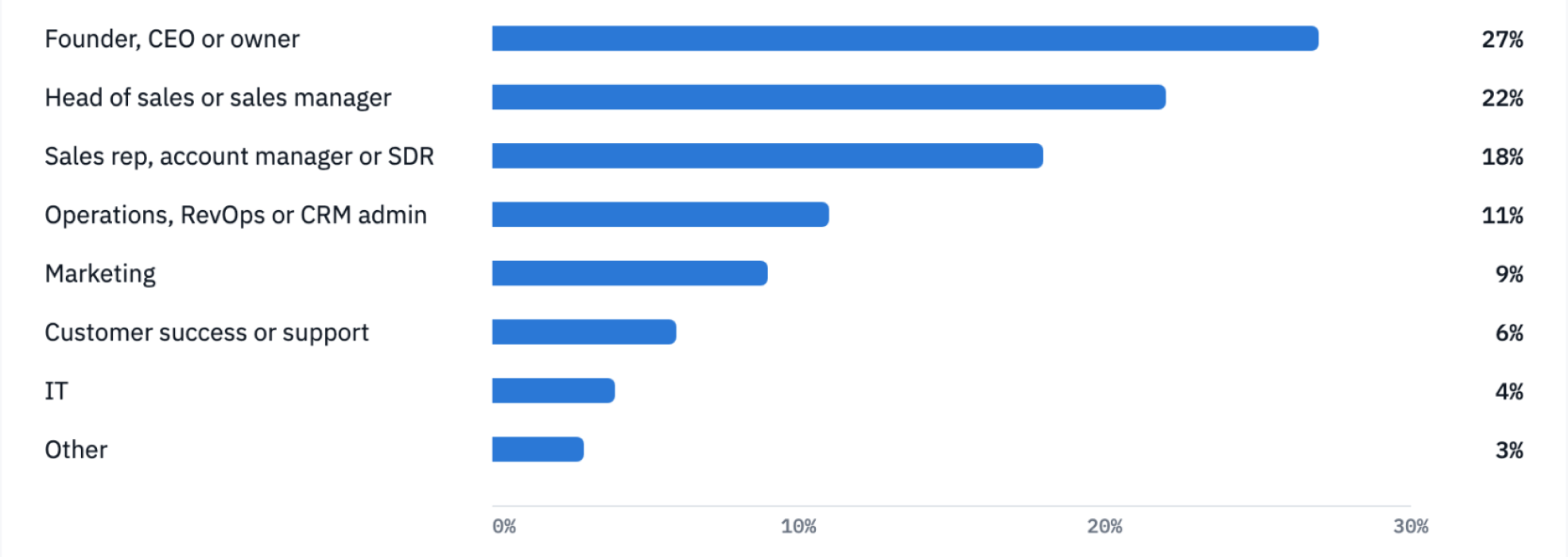
NetHunt CRM has collected more than 240 answers in 2026 so far, and the survey is still open. The results below are based on the first 240. Each respondent picked up to five of the 25 features below that matter most when they choose a CRM.
Pricing and data limits lead the ranking: predictable pricing (58%) and unlimited contacts (41%) beat every individual sales feature, with workflow automation third (39%). A third of respondents (33%) want a full CRM inside Gmail. Classic email features ended up at the bottom: automated email sequences (7%), email tracking and templates (6%), mass email campaigns (5%), web forms (4%) and calling from the CRM (3%).
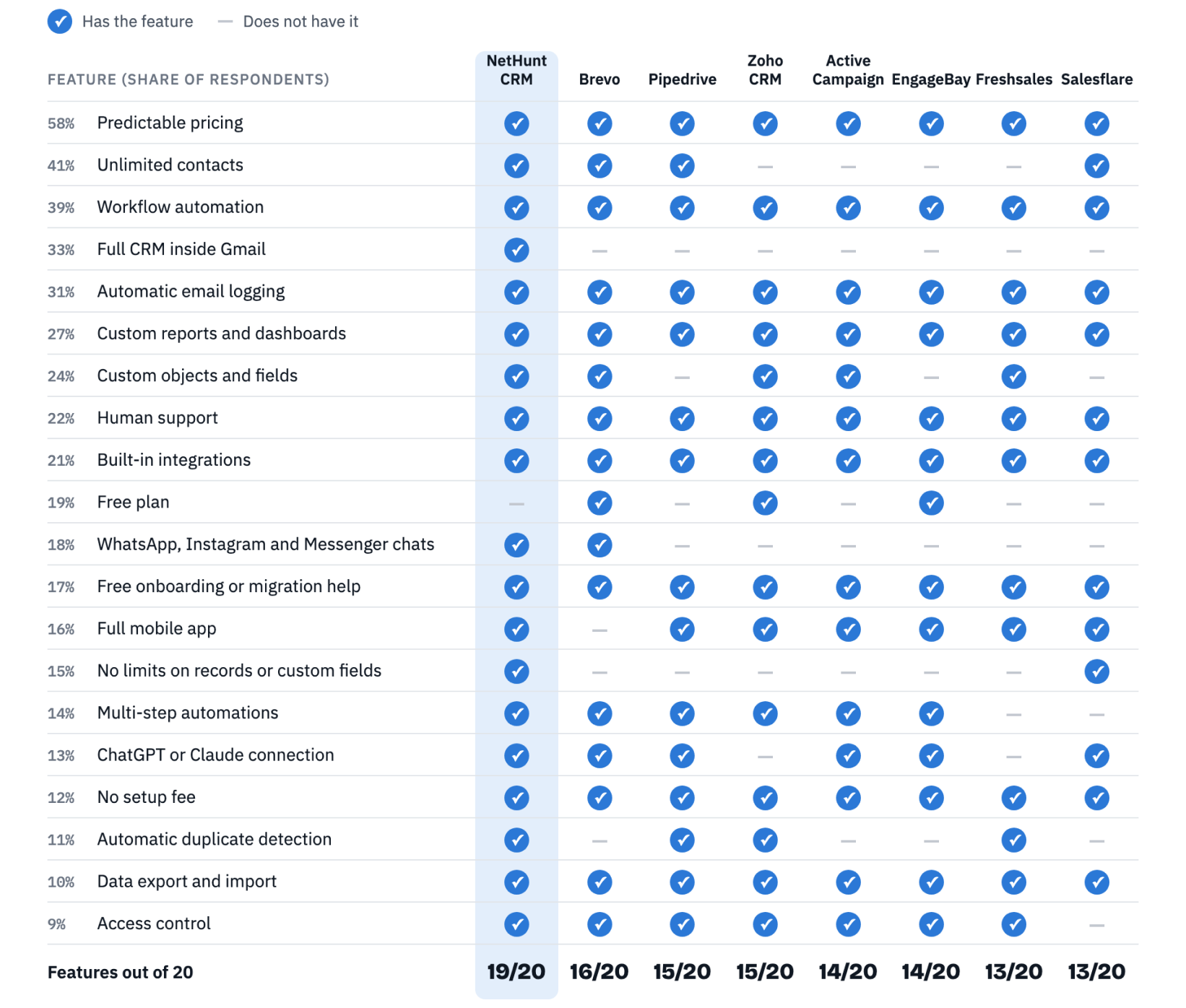
The 20 features that ranked highest became the scoring list in our comparison of 8 HubSpot alternatives, where each tool is checked against them. Below is what we found for each of the 25 features, with the sources behind it.
Key findings
- Pricing leads the survey too. Predictable pricing (58%) and unlimited contacts (41%) were the features the first 240 CRM users picked most often.
- Price structure is the #1 trigger. Costs grow with seats, contacts and tiers, and many essential features sit behind the Professional plan.
- Complexity comes second. On G2, “Learning Curve” (447 mentions) and “Limited Customization” (319) are among HubSpot Sales Hub’s top five cons.
- Reliability matters more than most comparison articles admit. On Capterra, 77% of 337 reviews that mention HubSpot CRM bugs and glitches are negative. We left it off the feature list because you can’t pick it from a pricing page, so test it during any trial.
- Small businesses search the most. “For small business” is the most common refinement of “hubspot alternative” in US search data, followed by “free.”
- HubSpot’s strengths are real. Ease of use is its most-praised trait on G2 (1,430 mentions). Any alternative has to match that bar.
How we researched this
We chose the 25 features from three sources, collected in November 2026: competitors’ pricing and help pages, G2 reviews and our survey of CRM users (more than 240 answers so far). To show the pain behind each feature, we also quote the public sources below:
- User reviews. Aggregated pros-and-cons themes and individual reviews from G2 (14,383 reviews of HubSpot Sales Hub), Capterra (HubSpot CRM, Sales Hub and Marketing Hub) and TrustRadius.
- Switching data. Capterra’s record of 252 reviewers who switched away from HubSpot CRM and where they went.
- Feature requests. Long-running threads on the HubSpot Community Ideas forum.
- Search demand. US search volumes from Ahrefs for “hubspot alternative” and related queries about pricing, limits and support.
We give more weight to a pain that shows up in aggregated review data, not just in a handful of comments. Where the evidence is thinner, we say so.
One caveat: reviews span 2021 to 2026, and HubSpot updates its plans regularly. Some older complaints may no longer apply. Always check HubSpot’s current pricing before you decide.
The 25 features buyers want in a HubSpot alternative
The survey offered 25 features and kept the 20 that ranked highest to score the tools in our comparison. The other five (automated email sequences, email tracking and templates, mass email campaigns, web forms and calling from the CRM) ranked lowest, but buyers still ask about them, so we cover them too. The features are ranked by the share of respondents who picked them, from 58% to 3%. For each one you’ll find the pain behind it, the evidence we found, and what to check when you evaluate a CRM. Where the evidence is thinner, we say so.
1. Predictable pricing
Survey share: 58% of respondents put it in their top five.
What buyers want: one clear price per user, with no surprise add-ons and a cost they can forecast a year ahead.
Why they’re looking: This is the most-cited problem in the whole dataset. Capterra groups HubSpot CRM reviews into a theme it calls “High and complex pricing structure.” It is negative in 35% of 884 mentions for the CRM and 46% of 1,244 for Marketing Hub. On G2, “Expensive” is one of Sales Hub’s top five cons, with 344 mentions.
The complaint is rarely that HubSpot costs too much on day one. It’s that the bill grows in ways teams didn’t predict. A CMO at a 2–10 person company on Capterra put it simply: HubSpot is “so expensive if you have to pay for features,” especially when one missing feature forces a jump to the Pro tier. An IT reviewer on Capterra Ireland said the structure makes the final bill hard to predict. A small business owner in September 2026 said they simply can’t afford it anymore as they grow.
Search data tells the same story. In the US, “hubspot pricing” gets about 46,000 searches a month, and “how much does hubspot cost” about 500.
What to check: Is there a public price list? Can you calculate your cost at twice your current team and database size?
2. Unlimited contacts
Survey share: 41% of respondents put it in their top five.
What buyers want: no cap on stored contacts, so the price stays the same when the database grows.
Why they’re looking: HubSpot’s marketing tools are priced in part by the number of “marketing contacts.” Reviewers say this makes growth itself expensive. A co-founder of a small company on Capterra wrote that they “detest their pricing structure and use of paid marketing contact thresholds.” On TrustRadius, a long-time user wrote: “Contact limits are tough to manage,” adding that the team keeps hitting the limit and the cost goes up.
The pattern repeats elsewhere. A real estate agent on Capterra (October 2026) said subscriptions get expensive quickly as the contact base grows. A small business on G2 complained about paying extra for each new lead. In US search, “hubspot marketing contacts pricing” gets about 150 searches a month.
What to check: Are contacts unlimited? If not, what happens to the price when you double your list?
3. Workflow automation
Survey share: 39% of respondents put it in their top five.
What buyers want: workflows and automation from the first paid tier, not two upgrades later.
Why they’re looking: On G2, the two most common cons for HubSpot Sales Hub are “Missing Features” (500 mentions) and “Limited Features” (472). Many of them describe features that exist but sit behind a higher plan. One mid-market reviewer said the features they need are only available at higher levels, so they end up paying a lot.
Capterra’s summary of 1,298 reviews says that advanced reporting, automation and custom workflows require paid tiers, and that the free version has daily action limits. An AVP of Marketing on Capterra wrote in May 2026: “Automation and workflow capabilities should also be included in the Starter plan.” A small education business on G2 framed it even more clearly: “We don’t need more contacts but more capabilities.”
What to check: Which plan unlocks workflows? Is that the plan you’d actually buy?
4. Full CRM inside Gmail
Survey share: 33% of respondents put it in their top five.
What buyers want: pipelines, deals and contact records right in the inbox, not only a sidebar that shows who they’re emailing.
Why they’re looking: Many small teams spend most of the day in Gmail. HubSpot connects to it through the HubSpot Sales Chrome extension, which adds contact profiles, tracking and logging to the inbox, while the pipeline itself stays in a separate HubSpot tab. Search shows how many people look for a tighter link. In the US, “hubspot gmail extension” gets about 700 searches a month and “hubspot gmail integration” about 350. Broader queries such as “gmail crm” (about 400) and “crm for gmail” (about 250) suggest that some buyers want the CRM in the inbox itself.
The extension is also a steady source of support questions. The Gmail Sales Extension board on the HubSpot Community has many threads about emails that don’t log, and the real estate founder from feature 5 reinstalled the extension several times. Still, few reviewers ask for a “CRM inside Gmail” in those words, so the review evidence is thinner here, and the survey share above carries more weight.
What to check: Can reps move a deal, update a record and see the pipeline without leaving Gmail? Are emails logged without ticking a box on every message?
5. Automatic email logging
Survey share: 31% of respondents put it in their top five.
What buyers want: emails, calls, meetings and messages captured in the CRM without manual entry.
Why they’re looking: A CRM is only as good as the data reps put into it. A sales operations manager on G2 (October 2026) noted that reports lose accuracy when reps don’t update activities. Other reviewers describe the gaps. An enterprise AE on Capterra had to log calls by hand and couldn’t log LinkedIn messages at all. A real estate founder reinstalled the Gmail extension several times because it kept stopping. A TrustRadius reviewer said sent LinkedIn messages don’t sync. A G2 discussion notes that the Outlook logging tool only logs to the client’s last five open deals.
Salesflare builds its whole HubSpot-alternative pitch around this pain, which shows how strongly vendors see it.
What to check: Connect your mailbox and calendar during the trial. How much shows up in the CRM without you touching it?
6. Custom reports and dashboards
Survey share: 27% of respondents put it in their top five.
What buyers want: custom reports, forecasts and revenue metrics on the plan they can afford.
Why they’re looking: Capterra’s theme “Limited and inflexible reporting features” is negative in 42% of 276 mentions. Its summary describes basic reports, restricted customization, slow dashboards, and advanced analytics locked behind higher-priced plans.
TrustRadius reviewers list “Limited Reporting” and missing MRR reporting among their cons. A sales development lead on G2 (September 2026) said forecasting and custom reporting are locked behind higher tiers, and that reporting is less flexible than in competing tools.
What to check: Build your three most important reports during the trial. Can you do it on the plan you’d buy?
7. Custom objects and fields
Survey share: 24% of respondents put it in their top five.
What buyers want: the freedom to model their own business (projects, orders, properties, locations) without an Enterprise contract.
Why they’re looking: “Limited Customization” has 319 mentions on G2, and TrustRadius reviewers list it as a con too. A RevOps manager on Capterra wrote that sales-side customization lags behind Salesforce, which limits how far HubSpot can scale.
Custom objects are the clearest example. On Capterra’s plan listing they sit in the Enterprise tier. On the HubSpot Community Ideas forum, users asked for them for years. One team said they had stored more than 382,000 orders as closed-won deals as a workaround. Another said they were considering Zendesk because of the gap. When the feature shipped for Enterprise only, users opened a separate request for Professional plans and pointed out that Salesforce includes custom objects in every edition. In US search, “hubspot custom objects” gets about 200 searches a month.
What to check: Can you create a custom object on the plan you’re considering? Can it be used in reports and automation?
8. Human support
Survey share: 22% of respondents put it in their top five.
What buyers want: a real person who solves the problem, whatever plan they’re on.
Why they’re looking: Support gets mixed reviews. Capterra’s summary of 763 reviews says many users find agents helpful, but some report delays, inconsistent answers, difficult escalation and billing issues. For Marketing Hub, reviewers add longer waits on lower-tier plans. A financial services CEO on Capterra (August 2026) said support provided no help at all. A TrustRadius reviewer said live chat sometimes just sends an article instead of helping. In US search, “hubspot customer support” gets about 250 searches a month.
What to check: Which plans include live chat or phone support? Send a real question during the trial and time the answer.
9. Built-in integrations
Survey share: 21% of respondents put it in their top five.
What buyers want: their tools connected without hiring a developer, and API limits they won’t hit.
Why they’re looking: Integrations are one of HubSpot’s strengths, so this need is about consistency rather than breadth. A sales operations manager on Capterra warned that mid-sized businesses with many add-ons may not connect everything easily. An account manager said tools like CallRail need a dedicated tech person to work properly. TrustRadius reviewers list “Better Third-Party Integrations” as a con. In search, “hubspot api limits” gets about 100 queries a month, and “why do I keep getting hubspot 429 errors” about 50.
What to check: Are your must-have tools covered by built-in integrations? What are the API rate limits on your plan?
10. Free plan
Survey share: 19% of respondents put it in their top five.
What buyers want: a free tier that’s useful for real work, not just a trial in disguise.
Why they’re looking: “Free” is the second most common refinement of “hubspot alternative” in US search. “Best free hubspot alternatives” gets about 100 searches a month and “hubspot alternatives free” about 70. A Capterra reviewer who used HubSpot’s free tier wanted more customization and higher contact limits.
This is also where HubSpot is strong. Several reviewers say its free CRM covers what a small business needs, including an apparel founder in September 2026. An alternative’s free plan has to clear that bar.
What to check: What are the free plan’s limits on users, contacts, pipelines and automation?
11. WhatsApp, Instagram and Messenger chats
Survey share: 18% of respondents put it in their top five.
What buyers want: messenger conversations in the same timeline as emails and calls, linked to the right contact or deal.
Why they’re looking: HubSpot’s conversations inbox handles email, live chat, WhatsApp and Facebook Messenger. Instagram is the gap users keep pointing to. The idea “Connect Instagram direct to Hubspot inbox” has been open since February 2022 and has 122 votes and 59 replies. In October 2025, HubSpot said Instagram DMs can now be handled in the Social Inbox, a marketing tool, but not in the conversations inbox. One user replied that tracking DMs from leads is a sales task, so it shouldn’t sit in the marketing package. A HubSpot partner on the same thread offers a third-party integration to fill the gap.
In US search, “hubspot whatsapp integration” gets about 250 searches a month, “hubspot whatsapp” about 100 and “hubspot instagram integration” about 60.
What to check: Which messengers connect natively, and on which plan? Do chats appear on the contact’s timeline, or only in a separate inbox?
12. Free onboarding or migration help
Survey share: 17% of respondents put it in their top five.
What buyers want: a vendor that helps them set up the CRM and move their data at no extra cost, so they don’t need a consultant.
Why they’re looking: “Learning Curve” has 447 mentions on G2. G2’s summary notes that without training, even the difference between contacts and leads confuses people. A construction consultant on Capterra (January 2026) wrote that setting up workflows is tedious and may require hiring a HubSpot expert. A Director of Sales reviewing in October 2026 found the system so hard to navigate that she stopped using it after a week.
Simplicity is also why people leave. Among the 252 Capterra reviewers who switched away from HubSpot CRM, one business owner who moved to Bigin by Zoho said she wanted something simpler and cheaper that didn’t take long to set up.
What to check: Will the vendor help you set up your pipeline and import your data for free? How long does it take a new rep to log a deal without help?
13. Full mobile app
Survey share: 16% of respondents put it in their top five.
What buyers want: the same CRM in their pocket, not a lighter version of it.
Why they’re looking: G2’s summaries of HubSpot Sales Hub’s two biggest cons, “Missing Features” and “Limited Features,” both name incomplete mobile app functionality. A G2 discussion thread asks whether there are plans to expand the app. On Capterra, a clothing brand founder said the app drains the battery during trade shows. An administrative manager (October 2026) said it lags when she needs to approve something away from her desk.
What to check: Can reps create deals, log calls and update pipelines from the app? Test it on a full workday in the field.
14. No limits on records or custom fields
Survey share: 15% of respondents put it in their top five.
What buyers want: room to grow the database and the data model without hitting a cap or buying an add-on.
Why they’re looking: HubSpot’s free plan stores up to 1,000 contacts and 1,000 records of other standard objects, according to its Product & Services Catalog. Paid plans raise that to 15 million, which is enough for most teams. The tighter limit is on fields: 1,000 custom properties per object on every paid plan. On Professional and Enterprise, a paid add-on adds 500 more, up to 3,000.
A one-person company described hitting that cap in the HubSpot Ideas thread “Remove the maximum of only allowing 1000 custom properties” (August 2021). Its forms had created new properties over time, and freeing up space meant checking each property against workflows before deleting it. Later replies, including a partner whose clients use Service Hub Enterprise, say the limit hurts larger accounts too.
This need overlaps with feature 2. Contact caps are about price, while record and field limits are about how far you can shape the CRM.
What to check: What are the limits on records, custom fields and pipelines on your plan? What happens, and what does it cost, when you reach them?
15. Multi-step automations
Survey share: 14% of respondents put it in their top five.
What buyers want: an automation builder that handles their real process, with branches and conditions, not just the standard case.
Why they’re looking: An automation engineer on Capterra (October 2026) called HubSpot’s workflows a capable low-code builder, but limited, often needing HubSpot-specific workarounds. A G2 reviewer (October 2026) found that switching on a workflow doesn’t enroll records that already match, and that routing meetings by territory took a form plus three separate links. A managing partner on Capterra (September 2026) noted the lack of split-testing for entire automation paths. G2 reviewers also describe workflow setup as daunting and very technical.
What to check: Rebuild one real workflow during the trial, including branches and existing records.
16. ChatGPT or Claude connection
Survey share: 13% of respondents put it in their top five.
What buyers want: to ask ChatGPT, Claude or another AI assistant about their own deals and contacts, through an official connector or an MCP server.
Why they’re looking: More teams now work in an AI assistant and want it to see CRM data without copy and paste. Search shows strong interest. In the US, “hubspot mcp” gets about 1,300 searches a month, and “hubspot chatgpt” and “hubspot claude” about 100 each. Queries such as “hubspot alternative with ai automation” get about 20 a month.
This is an area where HubSpot is strong. It lists connectors for ChatGPT, Claude, Gemini and Microsoft Copilot, plus MCP connectors, and its Breeze assistant works across the app, Slack and Gmail. We found few direct complaints that HubSpot lacks AI. One G2 reviewer wanted to test AI with selected users instead of only through permission sets. An alternative has to match HubSpot here, not just promise AI.
What to check: Is there an official connector or MCP server for the AI tools your team uses? Which plan includes it, and can you control what data the AI can see?
17. No setup fee
Survey share: 12% of respondents put it in their top five.
What buyers want: to start without a setup or onboarding fee, and to pay monthly if they choose.
Why they’re looking: Capterra’s pricing summary mentions mandatory onboarding fees on higher-tier plans. In US search, “hubspot onboarding fee” gets about 100 searches a month, and “how much does hubspot onboarding cost” about 50.
One July 2026 review on Capterra Ireland shows what’s at stake. The buyer says they were told before signing that HubSpot would help set up their integrations. After signing, they learned that level of help could cost thousands of dollars in extra services. Their $1,262.40 refund request was denied, and they filed complaints with two state attorneys general and the BBB. This is one buyer’s account, and HubSpot disputes it, but it shows why contract terms matter.
Salesflare also names the costly onboarding fee as a reason teams look elsewhere.
What to check: Is onboarding optional? Can you pay monthly? What is the cancellation and refund policy?
18. Automatic duplicate detection
Survey share: 11% of respondents put it in their top five.
What buyers want: clean data without manual clean-up sessions.
Why they’re looking: Duplicates come up again and again. A senior account executive with eight years on HubSpot said on Capterra that weak duplicate detection causes double work and stress. A Director of Growth on G2 (September 2026) asked for better flagging and merging of duplicate contacts and companies. A reviewer on Capterra Ireland (March 2026) said company duplicates make things messy and wished for an easy way to clean them up. TrustRadius users ask for streamlined data cleansing. According to Capterra’s plan listing, merging duplicates is a Professional feature.
What to check: Does the CRM flag duplicates on import and on entry? Is merging available on your plan?
19. Data export and import
Survey share: 10% of respondents put it in their top five.
What buyers want: easy export, a painless migration, and for some, an open-source or self-hosted option.
Why they’re looking: This is a search-driven signal more than a review theme. Variants of “hubspot alternative open source” add up to about 120 US searches a month. “Hubspot export data” gets about 50, and “migrate from hubspot” about 10. Vendors have noticed: Zoho, for example, offers free migration from HubSpot.
What to check: Can you export everything, including activities and attachments? Who handles the migration, and what does it cost?
20. Access control
Survey share: 9% of respondents put it in their top five.
What buyers want: control over who sees what, single sign-on, and a safe place to test changes, without paying for the top tier.
Why they’re looking: Capterra’s security summary for HubSpot CRM, based on 59 reviews, says field-level and granular controls can be limited or restricted to higher plans. For Marketing Hub, based on 54 reviews, reviewers describe permissions as rigid, confusing and not granular enough. On Capterra’s plan listings, single sign-on is an Enterprise feature, and so is the Marketing Hub sandbox.
What to check: Can you restrict access by field, team and record on the plan you’d buy? Is SSO included?
21. Automated email sequences
Survey share: 7% of respondents put it in their top five.
What buyers want: multi-step follow-ups that run on their own and stop when the lead replies, on a plan a small team can afford.
Why they’re looking: In HubSpot, sequences start on Sales Hub Professional. Starter users have asked for them for years. The HubSpot Ideas request “Allow Starter Hubspot members to purchase workflow/sequences as add-on” dates from March 2021. One commenter said the gap sits at the top of their pros-and-cons list when they compare HubSpot with other systems. A one-person business said they were considering Pipedrive or Freshsales because those vendors’ cheaper plans include sequences. In May 2026, HubSpot’s product manager for Sequences marked the idea as not currently planned. She pointed instead to a recent change: Sales Hub Professional no longer has a seat minimum, so a solo user can buy a single Professional seat.
Teams that already use sequences want them to be smarter. TrustRadius reviewers ask for contacts to drop out of sequences automatically once a call connects or a meeting is booked, and one found sequences confusing enough to use workflows instead. A G2 reviewer (September 2026) said sequences sometimes hit sending limits. In US search, “hubspot sequences” gets about 600 searches a month.
What to check: Which plan includes sequences? Do they stop automatically on a reply or a booked meeting? What are the daily sending limits?
22. Email tracking and templates
Survey share: 6% of respondents put it in their top five.
What buyers want: to see when a prospect opens an email or clicks a link, and to reuse proven templates instead of rewriting them.
Why they’re looking: HubSpot does this well, and buyers expect the same from any alternative. On Capterra, email tracking is 92% positive across 219 mentions. The limits are in the plans. HubSpot’s free tools include 3 email templates, while paid Sales Hub plans include 10,000. On Professional and Enterprise, click tracking requires a paid Sales seat.
Demand is high. In US search, “hubspot email templates” gets about 1,100 searches a month and “hubspot email tracking” about 500.
What to check: Are open and click tracking included for every user on your plan? How many templates can you save, and can the team share them?
23. Mass email campaigns
Survey share: 5% of respondents put it in their top five.
What buyers want: newsletters and bulk emails sent from the same system that holds the contacts, without a separate marketing platform or a price that grows with the list.
Why they’re looking: In HubSpot, marketing email belongs to Marketing Hub, which is priced partly by the number of marketing contacts (see feature 2). Template design is the other weak spot. For Marketing Hub, Capterra’s theme “Limited template customization options” is negative in 38% of 342 mentions. Reviewers say advanced changes need coding, and emails are hard to make visually distinct. A G2 reviewer listed the inability to match brand colors as a key dislike.
Campaigns are also one of HubSpot’s strengths. On Capterra, Marketing Hub’s marketing automation is 95% positive across 446 mentions, and campaigns 94% across 404. In US search, “hubspot email marketing” gets about 2,200 searches a month and “hubspot email marketing pricing” about 100.
What to check: Can you send campaigns on the plan you’d buy? Does the price depend on how many contacts you email? Can a marketer with no HTML skills recreate your brand template?
24. Web forms
Survey share: 4% of respondents put it in their top five.
What buyers want: website forms that send new leads straight into the CRM, with the right fields filled in and an owner assigned.
Why they’re looking: HubSpot’s forms are free and widely used: “hubspot forms” gets about 800 US searches a month. The complaints are about flexibility. An administrative manager reviewing Marketing Hub (October 2026) found fewer conditional-logic options in the form builder than expected. Routing form leads to the right rep is a plan question too: lead form routing is a Sales Hub Enterprise feature in HubSpot’s catalog. And as the thread in feature 14 shows, forms that create new properties can eat into field limits.
What to check: Can forms create or update the right record type, such as a lead, deal or custom object? Do they support conditional logic, and can they assign an owner automatically?
25. Calling from the CRM
Survey share: 3% of respondents put it in their top five.
What buyers want: calls placed from the record, with recordings and outcomes logged automatically.
Why they’re looking: HubSpot’s built-in calling comes with a monthly allowance of minutes, shared across the account: 500 on Starter, 3,000 on Professional and 12,000 on Enterprise, according to HubSpot’s calling update. Only users with a paid Sales or Service seat can use those minutes. Free accounts can connect third-party calling apps instead.
Teams that live on the phone want more. TrustRadius reviewers ask for better cold-calling features, and community users have asked how to raise minute limits without moving up a plan. In US search, “hubspot dialer” gets about 300 searches a month, “hubspot calling” about 250 and “hubspot power dialer” about 50.
What to check: How many calling minutes does your plan include, and what happens when you run out? Are calls recorded and logged automatically? Does it work with your current phone provider?
What HubSpot gets right
A fair comparison has to start from HubSpot’s strengths. Reviewers praise them far more often than they complain, and buyers will expect an alternative to match them.
| Strength | Evidence |
|---|---|
| Ease of use | “Ease of Use”: 1,430 mentions, “Intuitive”: 617 (G2) |
| Sales and marketing in one system | 93% positive across 612 mentions (Capterra, CRM); 94% across 1,670 (Capterra, Marketing Hub) |
| Lead management | 92% positive across 488 mentions (Capterra); “Lead Management”: 671 mentions (G2) |
| Email tracking | 92% positive across 219 mentions (Capterra) |
| Marketing automation and campaigns | 95% positive across 446 mentions; campaigns 94% across 404 (Capterra, Marketing Hub) |
| Pipeline visibility | “Helpful”: 760 mentions (G2) |
There’s a paradox here. Ease of use is HubSpot’s top strength, yet the learning curve is one of its top complaints. Capterra’s onboarding summary explains why: new users pick up contacts and pipelines quickly, but configuring workflows, reports and integrations takes far longer. The best alternatives are simple at both levels.
A quick checklist for choosing a HubSpot alternative
Before you sign with any CRM, including ours, run through these 25 questions, one for each feature above. Also run imports and automations at full volume during the trial: reliability does not show on a pricing page.
- Can I calculate my cost at twice today’s team and database size?
- Does the price stay the same as my contact list grows?
- Are workflows included in the plan I’d actually buy?
- Can my team update deals and records without leaving Gmail?
- Are emails, calls and meetings logged automatically?
- Can I build the custom reports I need on my plan?
- Can I create custom objects and fields on my plan?
- Did support answer a real question quickly during the trial?
- Are my must-have tools covered by built-in integrations?
- Is the free plan good enough for real daily work?
- Do WhatsApp, Instagram and Messenger chats land on the contact’s timeline?
- Will the vendor help me set up and move my data at no extra cost?
- Does the mobile app cover what my reps do in the field?
- Will I hit a limit on records or custom fields as my data grows?
- Can I rebuild one real workflow with if/else branches during the trial?
- Can ChatGPT, Claude or our other AI tools connect to the CRM on my plan?
- Is onboarding optional, and can I pay monthly?
- Does the CRM flag duplicates on import and merge them on my plan?
- Can I export all my data, and who handles migration?
- Can I restrict access by field, or use SSO, on the plan I’d buy?
- Are sequences included in the plan I’d buy, and do they stop when a lead replies?
- Are open and click tracking and shared templates included for every user?
- Can I send email campaigns without the price growing with my list?
- Do web forms create leads and assign an owner automatically?
- How many calling minutes do I get, and are calls logged automatically?
How NetHunt CRM approaches these 25 features
NetHunt CRM was built for B2B teams that work in Gmail and sell through email and messengers. It has 19 of the 20 features from our scoring list; the one it lacks is a free plan, with a 14-day free trial instead.
- Pricing: from $24 per user per month, billed annually. Contacts, records and custom fields are unlimited, and there is no setup fee.
- Automation and reporting: workflows with if/else branches, sequences and web forms are available on the higher plans. Custom reports run through the Looker Studio integration.
- Customization: custom fields and records are unlimited, and you can add your own record types (folders) for projects, orders or anything else you track.
- Migration: NetHunt CRM support helps teams move from HubSpot through CSV import at no extra cost.


 product experts — let's find the best setup for your team