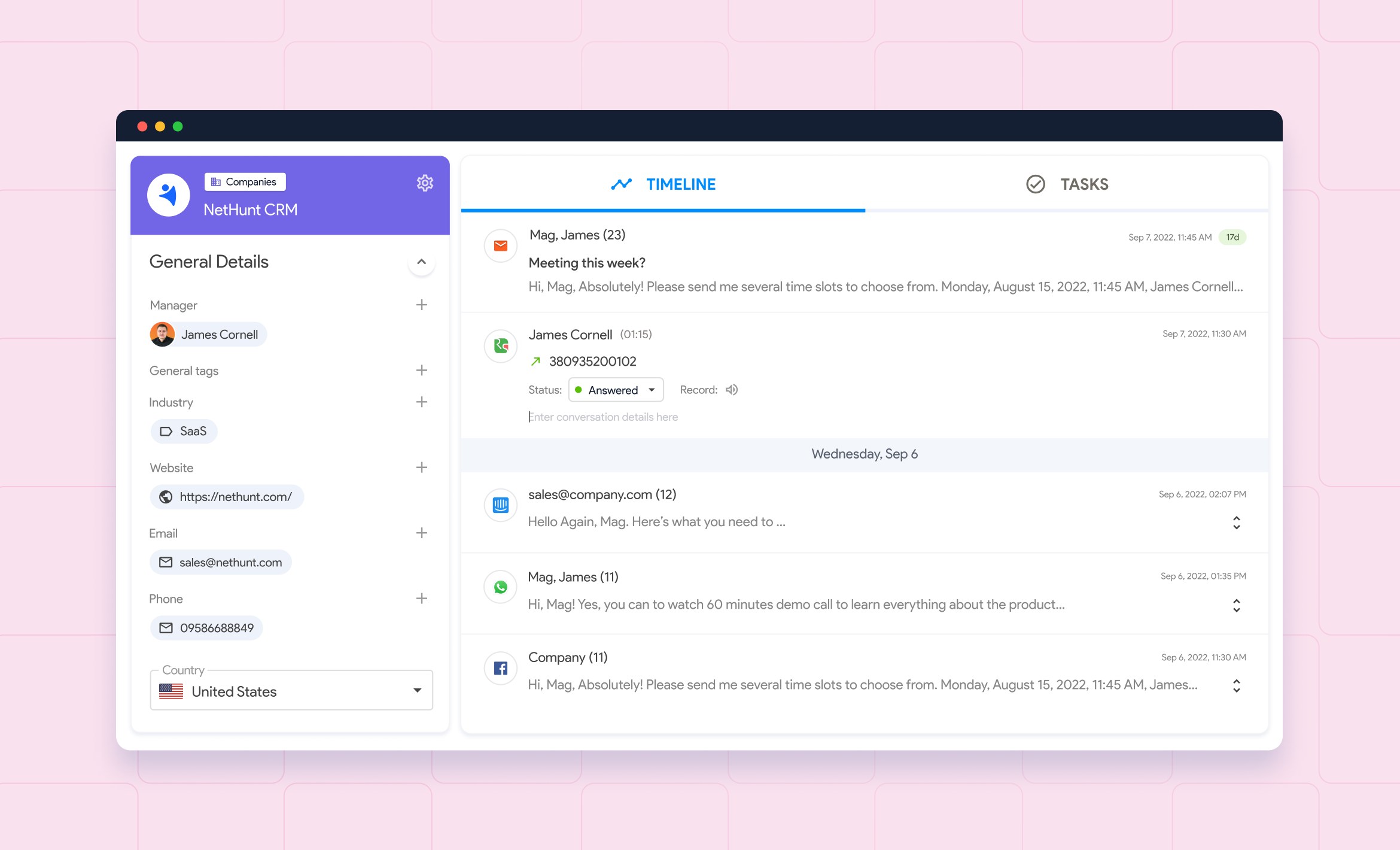
CRM stands for Customer Relationship Management — a software system that helps businesses store customer data, track every interaction, and manage sales pipelines in one central place. The rest of the terminology is in our CRM glossary.
Before CRM, teams relied on spreadsheets, sticky notes, and scattered email threads to keep track of leads and customers. It worked — until it didn't. As soon as a business starts growing, that approach breaks down: leads fall through the cracks, follow-ups get missed, and no one has a clear picture of what's happening in the pipeline.
A CRM fixes that by giving your entire team a single, organized source of truth about every contact, deal, and conversation — accessible from anywhere, updated in real time. Today's CRM software goes far beyond a contact list: it automates repetitive tasks, tracks every customer interaction, and gives leadership the data they need to make good decisions.
In this guide, you'll learn what CRM is, what types exist, which features matter most, how much it costs, and how to choose the right one for your business.
- A CRM system centralizes customer data, tracks every sales interaction, automates follow-ups, and gives managers real-time visibility into pipeline health and team performance.
- The three main types — operational, analytical, and collaborative — serve different needs, though most modern platforms combine all three.
- For growing businesses, CRM is typically the first investment that makes scaling a sales team possible without losing deals to disorganization.
What does a CRM system do?
At its core, a CRM system does five things that spreadsheets and email simply can't scale with:
- Stores contact data in one place. Names, emails, phone numbers, company info, and full customer interaction history — all attached to a single record, accessible by your entire team.
- Tracks deals and shows where leads are in the pipeline. You can see at a glance which deals are moving, which are stalled, and where your team needs to focus.
- Sends automated emails and follow-up reminders. Instead of relying on someone to remember to follow up, the CRM triggers the right message at the right time automatically.
- Logs customer support questions and service interactions. Every call, email, and chat is recorded, so the next person who picks up the conversation has full context.
- Generates reports on sales performance and trends. Revenue forecasts, conversion rates, team activity — all in real time, without manually pulling data from multiple sources.
CRM helps businesses of all sizes replace guesswork with process. The result: less time on admin work, more time on actual selling. According to Salesforce research, sales reps spend less than 30% of their time actually selling — the rest goes to data entry, scheduling, and chasing information. CRM software helps reclaim that time and redirect it where it actually moves revenue.
Types of CRM systems
Not all CRM systems work the same way. There are three main types, each built around a different business need — and most modern CRM platforms combine elements of all three.
Operational CRM
Operational CRM focuses on automating day-to-day customer-facing processes: sales, marketing, and customer service. It's the most common type and the one most people picture when they hear "CRM."
Key capabilities: lead capture, pipeline management, email automation, task creation, follow-up reminders, and deal tracking. If your primary goal is to stop losing leads and close deals faster, an operational CRM is where you start.
Analytical CRM
Analytical CRM is built around data. It collects customer information from multiple sources, identifies patterns in customer behavior, and turns that data into actionable insights — which customers are most likely to buy, which marketing campaigns drive the best leads, where deals tend to get stuck.
This type is most valuable for mid-to-large teams that have enough data to analyze and want to move from gut decisions to data-driven ones.
Collaborative CRM
Collaborative CRM — sometimes called strategic CRM — is designed to break down silos between departments. It ensures that sales, marketing, and customer service all work from the same customer data, so every handoff is smooth and no context is lost.
If your sales team closes a deal but your support team has no idea what was promised, you have a collaborative CRM problem.
Cloud vs. on-premise CRM software
Beyond the three types, CRM systems also differ in how they're deployed:
- Cloud-based CRM is hosted on the vendor's servers, accessible via browser or app from anywhere. Lower upfront cost, faster setup, automatic updates. This is the default for most modern businesses.
- On-premise CRM is installed on your own servers. More control over data and customization, but requires IT resources to maintain and typically a larger upfront investment.
For the vast majority of small and mid-sized businesses, a cloud-based CRM is the right starting point — see our ranking of the best CRMs for small business.
Essential CRM features every business needs
A CRM is only as good as the features it offers — we ranked the 15 CRM features that matter most. Here's what to look for — and how each one works in practice.
Contact management and CRM database
The foundation of any CRM. Every lead and customer gets a dedicated record — a complete customer profile containing their contact details, company info, communication history, and any custom fields your team needs. Good CRM software also prevents duplicate records, auto-links incoming emails to the right contact, and lets you segment your database using filters and tags.
With NetHunt CRM, for example, every contact record includes a Timeline section — a chronological log of every email, call, note, and deal update associated with that person.
Lead management
CRM handles the entire lead lifecycle: capturing leads from web forms, messengers, and social media; qualifying them with custom fields and scoring criteria; assigning them to the right rep; and moving them through the pipeline based on their behavior.
NetHunt captures leads from web forms, WhatsApp, Instagram, Facebook Messenger, Telegram, and Gmail — all flowing into the same system so nothing slips through.
Sales pipeline management
A visual pipeline lets your team see every active deal, which stage it's in, and what needs to happen next. Most CRM systems let you build multiple pipelines for different products, teams, or sales motions.
Email marketing automation
Built-in email marketing means you can run marketing campaigns, track opens and clicks, personalize messages with contact data, and set up drip sequences — all without leaving the CRM. NetHunt's email campaigns run directly from Gmail, with full deliverability controls including SPF, DKIM, and custom tracking domains.
Sales automation
Automation handles the repetitive work: moving deals between stages when conditions are met, assigning leads by round-robin, sending follow-up emails when a prospect goes quiet, creating tasks when a deal advances. With NetHunt Workflows, this is all no-code — if-this-then-that logic that any team member can set up without a developer.
Reporting and analytics
CRM reporting gives managers visibility into team performance, pipeline health, conversion rates, and revenue forecasts. Advanced CRM systems offer goal tracking per rep, time-in-stage analysis, and integration with tools like Google Looker Studio for custom dashboards.
Collaboration features
Shared records, internal comments, mentions, task assignments, and Slack notifications keep the whole team aligned. When a deal closes or a lead changes hands, everyone who needs to know gets notified automatically.
AIi in CRM: how the CRM tool is evolving
The most significant shift in CRM over the past two years is the move from navigation-based interfaces to natural language querying. Instead of clicking through filters and menus, sales teams can now ask their CRM questions directly — and get answers from live data. The technology enabling this is MCP (Model Context Protocol), an open standard that connects AI assistants like ChatGPT, Claude, and Grok to external systems including CRM databases.
NetHunt CRM supports MCP, which means you can connect your AI assistant of choice and ask it things like:
- "Show me all deals from software companies that haven't been updated in two weeks."
- "Why hasn't the Acme deal closed yet?"
- "Move the Beta Corp deal to Negotiation and create a follow-up task for tomorrow."
The AI searches your CRM, analyzes the data, and takes action — without you clicking through screens or building reports manually. Access is secured via OAuth and respects your existing user permissions, so AI can only see what you're already allowed to see.
This is where modern CRM systems are heading: less clicking, more asking. Teams that adopt AI-connected CRM now will have a significant workflow advantage over those still navigating manually.
NetHunt CRM includes all of the above natively — contact management, pipeline tracking, email automation, no-code workflows, and MCP-based AI access — without requiring third-party add-ons for core functionality.
Key benefits of using a CRM solution
Understanding the benefits of CRM is essential before committing to a platform. Here is what a well-implemented CRM delivers.
Keeps your CRM database clean and organized
Every lead, customer, and deal lives in one place. Duplicate prevention, auto-linking of emails, and data enrichment tools keep records accurate without manual cleanup. When customer information is reliable, every team member can act on it with confidence.
Saves time through marketing automation and workflows
Automated follow-ups, lead assignment, stage changes, and notifications eliminate hours of repetitive admin work per week. That time goes back to selling, strategizing, or simply doing less busywork. CRM also streamlines marketing efforts — automated sequences replace manual campaign management.
Improves customer relationships and customer experience
When any team member can pull up a contact's full history in seconds, conversations feel personal — not transactional. No more "can you remind me what we discussed last time?" moments. CRM helps improve customer experience across every touchpoint by ensuring context never gets lost between interactions. Stronger customer relationships lead directly to better customer satisfaction and long-term loyalty.
Gives managers real-time visibility
Sales forecasts, team performance, pipeline health — all available without chasing status updates from reps. Managers can spot bottlenecks and coach in real time instead of reacting after the fact.
Helps identify the best acquisition channels
CRM tracks where every lead came from — email campaign, web form, WhatsApp, referral — and which sources convert best. Marketing and sales teams can then double down on what works and cut what doesn't.
Scales with your business needs
A good CRM grows with you. What works for a 3-person team can be configured and expanded for a 50-person team without switching systems or migrating data. CRM gives businesses a structured foundation that improves customer relationships at every stage of growth.
Who can use a CRM system?
Sales teams
Sales reps use CRM to manage their pipelines, track every deal, log calls and emails automatically, and get reminded when a follow-up is due. Sales managers use it to monitor team performance, forecast revenue, and coach reps based on actual data — not gut feel.
Marketing teams
Marketers use CRM to segment audiences, run marketing campaigns, track which content generates qualified leads, and measure campaign ROI. Agencies have their own shortlist of CRMs. With a shared database, marketing teams and sales finally have the same definition of a "good lead." CRM gives marketing the customer data it needs to run more targeted marketing efforts.
Customer service teams and customer interaction
Support teams use CRM to access a customer's full history before picking up the phone or replying to an email. Every previous customer interaction, purchase, and complaint is visible, so responses are faster and more informed. Automated ticket routing and round-robin task assignment reduce response times further, improving customer satisfaction across the board. Good customer support is the foundation of strong customer relationships.
Founders and managers
At the executive level, CRM provides a reliable, real-time view of the business. Revenue forecasts based on actual pipeline data, team activity reports, and conversion analytics give leadership the information needed to make good decisions — without relying on anecdotes or outdated spreadsheets.
Which businesses need a CRM — and which type fits best?
The short answer: any business that has grown beyond the point where one person knows everything about every customer. A new CRM system is one of the highest-leverage investments a growing company can make. 91% of businesses with more than 11 employees now use CRM software — compared to 50% among smaller firms.
By business size
Startups and small teams benefit from CRM earlier than most expect. Even with 3–5 people, having a structured system prevents early bad habits — leads tracked in personal spreadsheets, deals living in one rep's inbox — that become expensive to fix later. Implementing a CRM early means your sales process scales with your team, not against it.
Mid-sized businesses (10–100 people) are where CRM impact is most dramatic. At this scale, the cost of disorganization becomes measurable: missed deals, duplicated outreach, slow onboarding of new reps who can't access historical context. Our complete guide to B2B CRM goes deeper on this segment.
Enterprises need CRM for compliance, forecasting accuracy, and cross-departmental visibility. At this level, CRM typically integrates with ERP, marketing automation platforms, and custom data infrastructure.
By industry
NetHunt CRM works particularly well for:
- SaaS and tech companies — managing trials, renewals, and churn
- Digital marketing agencies — tracking client relationships and project pipelines
- Real estate agencies — managing listings, buyers, and transaction workflows
- Travel agencies — storing client preferences and booking history
- Law firms — managing cases, deadlines, and client communications
- Startups — building a scalable sales process from day one
Choosing the right CRM: 8 criteria to evaluate
Before choosing a CRM, use this framework to evaluate your options. These are the criteria that separate a tool your team will actually use from one that collects dust after onboarding. The right CRM solution is the one that fits how your team already works — not the one with the longest feature list.
| Criterion | What to ask |
|---|---|
| Ease of adoption | How long does it take a new rep to get up and running? Is there a learning curve that will cause pushback? |
| Integration depth | Does it connect natively with the tools your team already uses — Gmail, Slack, WhatsApp, Google Calendar? |
| Automation capabilities | Can you automate follow-ups, lead assignment, and stage changes without writing code or involving a developer? |
| Contact and pipeline management | Does every contact have a complete, chronological history? Can you build multiple pipelines for different sales motions? |
| Reporting and analytics | Can you track team performance, forecast revenue, and see where deals get stuck — without exporting to spreadsheets? |
| Multi-channel communication | Does it capture leads from email, messengers (WhatsApp, Instagram, Telegram), and web forms in one place? |
| AI readiness | Can it connect to AI tools to search, analyze, and act on your CRM data using natural language? |
| Scalability and pricing | Will the pricing stay reasonable as your team grows? Does the platform offer the features you'll need in 12 months? |
NetHunt CRM scores well across all eight — with native Gmail integration, no-code automation, multi-channel lead capture, and MCP-based AI connectivity built in.
Common CRM implementation challenges — and how to solve them
CRM implementation doesn't always go smoothly. Here are the four most common problems teams run into, and how to get ahead of them.
Low user adoption
The problem: Reps see a new CRM system as extra admin work and continue logging deals in personal spreadsheets or their heads.
The solution: Choose a CRM software solution that fits into existing workflows rather than adding new ones. NetHunt lives inside Gmail — reps work from the inbox they're already in, so adoption friction is minimal. Also involve the team in setup decisions; people use tools they helped design. Larger teams usually hand this to a CRM manager.
Dirty data
The problem: Duplicate records, missing fields, outdated customer information — the database becomes unreliable and reps stop trusting it.
The solution: Use a CRM with built-in duplicate prevention, auto-linking of emails to the right records, and data enrichment integrations (Apollo, Hunter) that keep contact info current automatically.
Integration complexity
The problem: CRM doesn't talk to your other tools — email, calendar, customer service software — so data lives in multiple places anyway.
The solution: Prioritize native integrations over API workarounds. NetHunt integrates natively with Gmail, Google Workspace, WhatsApp, Instagram, Facebook Messenger, Slack, and Google Calendar — no third-party connectors required for the tools most teams use daily.
Unclear ROI
The problem: Leadership can't see whether implementing a CRM is actually improving sales performance, so investment is questioned.
The solution: Set up reporting before you need it — pipeline reports, team performance dashboards, and conversion tracking. A good CRM system can help teams demonstrate ROI clearly, but only if you've configured it to measure the right things from day one.
CRM vs. ERP: what's the difference?
CRM and ERP are often mentioned together, but they solve different problems — here's the full CRM vs ERP comparison.
CRM (Customer Relationship Management) focuses on the outside world: managing relationships with leads and customers, tracking sales activity, and improving revenue generation. A CRM strategy is about building and maintaining strong customer relationships that drive long-term growth.
ERP (Enterprise Resource Planning) focuses on internal operations: finance, HR, supply chain, inventory, and accounting.
Think of it this way: CRM answers "how are we doing with our customers?" — ERP answers "how are we running the business?"
The two systems complement each other. Many larger companies run both, with CRM and ERP sharing a common database so sales teams can see a customer's payment history and finance teams can see pipeline data. Some ERP platforms include basic CRM applications, but standalone CRMs like NetHunt typically offer deeper sales functionality.
For most growing businesses, CRM comes first — you need to manage customer relationships before you need to manage a supply chain.
How much does a CRM system cost?
CRM pricing varies widely depending on the features, number of users, and vendor. Here's a rough breakdown:
- Entry-level (10–30/user/month): Basic contact management and pipeline tracking. Good for very small teams or CRM beginners. Limited automation and reporting.
- Mid-range (30–100/user/month): This is the sweet spot for most growing businesses. Full automation, multi-channel integrations, email campaigns, advanced reporting, and AI features. NetHunt CRM sits in this tier — good CRM software that delivers enterprise-grade functionality without enterprise pricing.
- Enterprise ($100+/user/month): Unlimited customization, advanced compliance controls, dedicated support, and deep integrations across large organizations. Examples: Salesforce Enterprise, HubSpot Enterprise.
Pricing models to know:
- Per user, per month — the most common model. You pay for each seat.
- Tiered plans — different feature sets at different price points. You upgrade as you need more.
- Flat-rate — one price for the whole team, regardless of seat count. Less common but predictable.
Many CRMs offer a free trial — NetHunt included. The best way to evaluate CRM pricing is to calculate the cost of not having a CRM: missed deals, wasted rep time, and the revenue that fell through the cracks.
CRM software trends to watch
AI and natural language interfaces
The CRM market was valued at $73.4 billion in 2024 and is projected to reach $163 billion by 2030 at a 14.6% CAGR, driven largely by AI and automation. The shift from "click through menus" to "ask your CRM a question" is accelerating. MCP-based AI integrations — like NetHunt's connection to ChatGPT and Claude — are moving from novelty to standard expectation. Expect most CRM vendors to offer some form of AI assistant within the next 12–18 months.
Hyper-personalization at scale
AI-powered segmentation means businesses can tailor outreach to individual behavior patterns rather than broad audience segments. Modern CRM systems that connect behavioral data across email, web, and messaging channels will have a significant edge in delivering relevant customer experiences across the customer journey.
Mobile-first CRM
Field sales, remote teams, and hybrid work have made mobile CRM a necessity, not a nice-to-have. Expect continued investment in mobile-native features: business card scanning, voice-to-record, and offline access.
Industry-specific CRM
Generic CRM is giving way to purpose-built solutions for specific verticals — real estate transaction management, legal case tracking, SaaS renewal pipelines. We compared the best CRMs for law firms separately. Platforms that offer deep industry customization without requiring custom development will win in these segments.
How to use a CRM: getting started guide
Committing to a CRM is one thing. Rolling it out successfully is another. Here's a checklist that works:
- Define your goals before you configure anything. Are you trying to stop losing leads? Forecast revenue more accurately? Speed up response times? Goals determine which features to set up first.
- Map your sales process. Know your pipeline stages, your team's roles, and where deals currently get stuck before you recreate it in a new CRM system.
- Migrate your data cleanly. Import existing contacts and deals, but clean the data first — remove duplicates, standardize field formats, fill in missing info. Dirty data in = dirty data out.
- Set up integrations on day one. Gmail, calendar, and your main communication channels should be connected before your team starts using the system, not after.
- Run onboarding, not just a tutorial. Have your CRM vendor walk your team through real workflows with your actual data. Generic demos don't drive adoption; personalized setup does. NetHunt offers hands-on onboarding as part of its implementation process.
- Automate the most painful manual tasks first. Pick the two or three workflows your team complains about most — lead assignment, follow-up emails, stage updates — and automate those in week one.
- Review and adjust after 30 days. CRM setup is not a one-time event. Check what's being used, what's being ignored, and adjust accordingly.
Switching from another CRM? NetHunt has migration guides for Streak,Copper, Pipedrive, Zoho, and Insightly.
Why NetHunt CRM
Most CRMs ask you to adapt to them. NetHunt adapts to you — because it lives inside Gmail, the inbox your team already works in. It's the best CRM for teams that want to improve customer experience without overhauling how they work.
Here's what that means in practice:
- No context switching. Reps manage deals, log calls, send follow-ups, and update records without leaving Gmail. Less friction means higher adoption.
- Multi-channel lead capture in one place. Leads from WhatsApp, Instagram, Facebook Messenger, Telegram, LinkedIn, and web forms all flow into the same pipeline. No lead source is left untracked.
- No-code automation. Workflows run on if-this-then-that logic — trigger on field changes, deal stage updates, email interactions, or time-based conditions. No developer required.
- AI-ready via MCP. Connect ChatGPT, Claude, or Grok to your CRM and use CRM tools to manage your pipeline using natural language. Search records, analyze deals, update data — without opening NetHunt.
- Transparent pricing. No surprise fees as you grow. Plans scale by team size, not by feature gates.
Recom, a B2B lead generation company, reduced manual data entry to near-zero and increased sales team productivity by 40% after switching to NetHunt — primarily by automating lead assignment and follow-up sequences that had previously been handled manually.
FAQ
What is CRM?
CRM stands for Customer Relationship Management. It refers to both a business strategy and the customer relationship management software that makes that strategy scalable — centralizing customer data, tracking every customer interaction, and automating sales and marketing processes to help businesses build strong customer relationships at scale.
What are the three types of CRM?
The three main types of CRM systems are operational (automates sales, marketing, and service processes), analytical (analyzes customer data to find patterns and predict behavior), and collaborative (shares customer data across departments to ensure consistent experiences). Most modern CRM platforms combine elements of all three.
What is the difference between CRM and ERP?
CRM manages customer-facing processes — leads, sales and marketing, and customer support. ERP manages internal business operations — finance, HR, inventory, and supply chain. CRM focuses on growing revenue and improving customer relationships; ERP focuses on operational efficiency. The two systems complement each other and are often integrated in larger organizations.
What is AI CRM?
An AI CRM is a CRM platform that uses artificial intelligence to automate tasks, generate insights, and assist users with natural language queries. AI features can include predictive lead scoring, automated data entry, email generation, pipeline analysis, and — through MCP integrations — the ability to control your CRM using conversational AI tools like ChatGPT or Claude. Modern CRM systems offer AI features that improve customer experience and reduce manual workload significantly.
What is MCP in CRM?
MCP stands for Model Context Protocol — an open standard that allows AI tools to securely connect to external applications like CRM systems. With MCP, you can ask your AI assistant to search your CRM, update records, analyze deals, or generate reports using plain language, without logging into the CRM itself. NetHunt CRM supports MCP, enabling connections with ChatGPT, Claude, Grok, and other compatible AI tools.
How much does a CRM cost for a team of 10?
For a team of 10, expect to pay between $150–$1,000/month depending on the CRM and feature tier. Entry-level CRMs cost $10–$30/user/month. Mid-range platforms like NetHunt CRM typically fall in the $30–$60/user/month range with full automation, multi-channel integrations, and reporting included. Enterprise CRMs can exceed $100/user/month.
What happens if you run a business without a CRM?
Without a CRM, customer data lives in spreadsheets, inboxes, and people's heads. As the business grows, leads get lost, follow-ups get missed, and there's no reliable way to forecast revenue or measure team performance. When a rep leaves, their contacts and deal history often leave with them. Competitors who use CRM tools have a systematic advantage in every part of the sales process.
How long does CRM implementation take?
For a cloud-based CRM like NetHunt, basic setup takes a few hours — connect Gmail, import contacts, build your first pipeline. A full rollout with automations, integrations, and team onboarding typically takes 1–2 weeks. The faster your team adopts it, the sooner you see results.
What is the most commonly used CRM?
Salesforce is the most widely used CRM globally, particularly among enterprise companies. For small and mid-sized businesses — especially those using Gmail and Google Workspace — alternatives like NetHunt CRM, HubSpot, and Pipedrive are more common due to lower cost, easier setup, and better fit for team size.
How do I choose the right CRM for my business?
Start with your current tools and workflows: does the right CRM solution integrate natively with your email, calendar, and communication channels? Then consider team size, budget, and the features you'll actually use in the first 90 days — not the ones that look impressive in a demo. Run a free trial with real data, not dummy accounts, and measure adoption after two weeks. If the team isn't using it, the best feature set in the world won't help.



 product experts — let's find the best setup for your team