










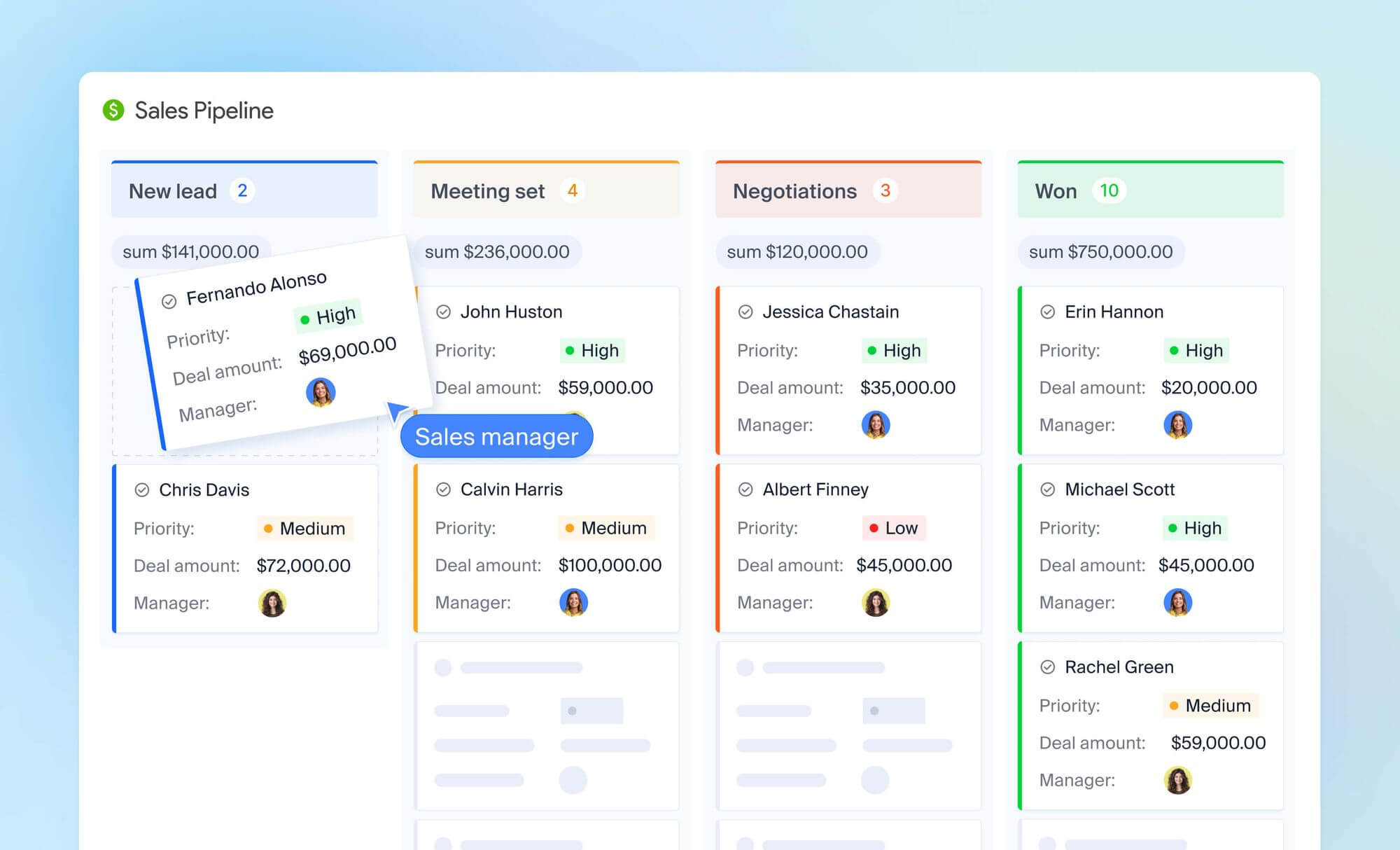
Sales pipeline management is the discipline of keeping sales opportunities accurately staged, actively owned, and useful for decisions. It combines clear stage definitions, reliable deal data, scheduled next actions, regular inspection, and metrics that show whether the team has enough qualified opportunity to reach its target.
A visual board is only the interface. The real pipeline is the agreement your team has about what each stage means, what evidence moves a deal forward, when an opportunity should leave the active forecast, and which action comes next.
Quick answer: what good pipeline management includes
- Stages based on observable buyer or seller milestones
- Entry and exit criteria for every stage
- An owner, value, expected close date, and next action for every active deal
- Stage-specific time expectations and stale-deal rules
- Weekly deal inspection and monthly trend analysis
- Coverage targets based on historical win rates
- Conversion, velocity, loss, and forecast metrics by segment
- CRM automation for repeatable administrative actions
- Clear separation between verified data, rep judgment, and AI-generated analysis
How healthy is your sales pipeline? Score it in 5 minutes
Before diving in, run a quick self-assessment. Rate each area 0–2 and add up your score.
| Area | 0 | 1 | 2 |
|---|---|---|---|
| Stage definitions — every pipeline stage has entry criteria and a defined next action | No stages defined | Stages exist but criteria are vague | Clear entry/exit criteria for every stage |
| Data accuracy — deal values and close dates are updated at least weekly | Rarely updated | Updated inconsistently | Updated weekly as standard |
| Velocity tracking — you know your average days per stage | Not tracked | Tracked occasionally | Tracked and reviewed regularly |
| Follow-up consistency — every deal has a scheduled next step | No system | Relies on rep memory | Automated or structured cadence |
| Lost deal tracking — you record why deals are lost and review the sales data | Not recorded | Recorded but not reviewed | Recorded and used to improve process |
What your score means:
- 0–4 — Your pipeline needs a rebuild.
- 5–7 — Solid foundation, but gaps exist.
- 8–10 — Well-managed pipeline.
Quick sales pipeline definitions
- Sales pipeline — a visual representation of where every active deal stands in your sales process, from initial contact to closed sale. A sales pipeline is a visual tool that shows each opportunity, its stage, value, and next action at a glance.
- Pipeline management — the ongoing management process of keeping that pipeline accurate, moving, and meaningful. Pipeline management is the process of tracking and managing every sales opportunity through every stage — from discovery to close. It's less about the tool and more about the discipline of updating stages honestly, clearing out stale opportunities, and using data to decide where to focus time and resources.
- Pipeline velocity — how quickly deals move through your pipeline, expressed as revenue generated per day. The formula: (number of deals × win rate × average deal size) ÷ sales cycle length in days. Increasing any one variable improves velocity.
- Sales funnel vs. sales pipeline — these are often used interchangeably, but they're different. A sales funnel describes how volume decreases as prospects move through the sales journey from awareness to purchase — it's a marketing concept focused on conversion rates. A pipeline is an operational tool for sales teams that tracks individual deals, their stage, value, and next action. You need both, but for day-to-day sales management, you're working with the pipeline.
What is sales pipeline management?
Sales pipeline management is the systematic process of tracking, organizing, and guiding every active deal through your process — from first contact to closed sale. Pipeline management is the process that keeps those stages accurate, the deals moving, and the data reliable enough to build sales forecasts from.
In practice, this means reviewing deals regularly, updating stages based on real activity, disqualifying opportunities that are going nowhere, and using pipeline data to make decisions about where your team should focus.
In a modern CRM like NetHunt, your pipeline isn't just a tracking board — it's the operational backbone connecting lead capture, communication history, task management, automated follow-ups, and revenue forecasting in one place. That's what effective pipeline management looks like when it's built on the right system.
What does a sales pipeline look like in practice?
A sales pipeline looks like a visual board with columns for each stage. Every deal is a card showing the contact name, deal value, and days in stage. At a glance, your team can see exactly where every opportunity stands in the sales process — no spreadsheet archaeology required.
In NetHunt CRM, multiple sales pipelines can run simultaneously for different products, customer segments, or sales motions — so a team selling both direct and through partners doesn't have to cram both processes into one view.
Why pipeline management in sales matters for B2B teams
Without a managed pipeline, sales becomes reactive: sales reps chase whoever replied last rather than whoever is most likely to close. Sales leaders rely on subjective weekly updates instead of real data. Revenue planning becomes a guessing game.
Companies with a clearly defined sales process grow revenue 18% faster. And those that master specific pipeline management strategies grow 28% faster than their peers. That's why getting it right matters — strong pipeline management is one of the highest-leverage investments in sales and revenue growth a team can make. Pipeline management is important to prioritize early.
A well-managed pipeline changes the picture in several concrete ways:
- Accurate sales forecasting. Because every deal carries a stage, a value, and a probability, your CRM can calculate expected revenue at any point — without gut feel. If you have $300K in pipeline and historical data shows your close rate at that stage is 40%, you know to expect roughly $120K. That's a number you can build a quarter around. Accurate sales forecasting depends entirely on clean, up-to-date pipeline data.
- Better rep focus. Most reps carry 20–40 active deals. Without a pipeline, they gravitate toward deals they remember or ones that feel comfortable — not necessarily the ones most likely to close. A clear pipeline forces prioritisation based on data, not comfort.
- Faster deal progression. When every stage of the buying cycle has a defined trigger and next action, deals don't sit idle. A rep knows that when a demo is completed, the next step is a proposal within 48 hours — not "follow up sometime."
- Coaching clarity. Pipeline data shows sales managers exactly where deals stall. If 60% of deals die at the Proposal stage, that's a specific coaching conversation about proposal quality or pricing — not a vague conversation about what went wrong.
- Cross-team alignment. When marketing and sales share pipeline visibility, handoffs improve. Marketing can see which lead sources convert best; sales can tell marketing which segments aren't worth the effort. Sales and marketing alignment starts with a shared view of pipeline data.
7 sales pipeline stages and what actually happens at each one
You don't need all seven for every business. A two-person sales team might run five stages comfortably. An enterprise team might need nine. But these are the core stages of the sales pipeline that matter most, and here's what experienced operators know about each one.
Stage 1: Discovery
This is where your sales pipelines start filling. Discovery is about identifying prospects who match your ideal buyer profile — through cold outreach, content, advertising, referrals, or inbound traffic.
The question you're answering at this stage of the sales process isn't "are they interested?" It's "should we be talking to this person at all?" Bad discovery work fills your pipeline with leads that will never close and slows every stage of the pipeline that follows.
How NetHunt CRM helps: NetHunt automatically captures leads from multiple sources — web forms, Gmail, WhatsApp, Instagram, Facebook, and more — and creates contact records without manual data entry. Every new lead lands in the right pipeline stage from the start.
Tip: Keep discovery wide but qualification tight. Cast a broad net, then cut aggressively at the next stage.
Stage 2: Qualification
A lead moves to qualification when they've shown some level of engagement: they replied to outreach, filled out a form, or accepted a connection request. The qualification stage is where you determine whether that engagement signals genuine buying potential.
Use a framework like BANT (Budget, Authority, Need, Timeline) or MEDDIC to structure your qualification conversations. The goal is to determine whether this lead is worth pursuing. If they're not a fit, disqualify them cleanly and move on — a disqualified lead protects your pipeline from dead weight.
How NetHunt CRM helps: Qualified leads are automatically assigned to the right rep with no manual handoff required. Automated email sequences keep leads warm between touchpoints, and the Timeline view gives reps a full picture of every interaction before they pick up the phone.
Stage 3: Demo
A scheduled demo or discovery call is the first time you're actively selling. By this point you should know enough about the prospect's situation — their team size, pain points, current tools, budget signals — to make the demo feel tailor-made.
Generic demos lose deals. The best demos open with a summary of what you heard in qualification ("You mentioned your biggest challenge is reps not following up after the first call — let me show you exactly how we solve that") and close with a clear next step.
How NetHunt CRM helps: All lead research — previous conversations, company details, industry notes, and interaction history — is stored in the contact record and accessible in seconds before any call. Nothing falls through the cracks because it lives in the CRM, not in a rep's memory.
Stage 4: Proposal
The proposal stage is where deals either accelerate or stall. A good proposal doesn't just present pricing — it re-sells the value in writing, for every stakeholder who wasn't in the demo room.
A strong proposal includes:
- A concise summary of the prospect's stated pain points (in their words, not yours)
- The solution mapped specifically to those pain points
- Clear pricing with all options presented — don't make them ask for the mid-tier plan
- Implementation timeline and onboarding plan
- Contract terms and what happens next
One critical discipline: send the proposal, then immediately schedule a follow-up call. Never let a proposal sit in someone's inbox without a next step attached. Deals that go quiet after a proposal rarely come back.
How NetHunt CRM helps: Automated follow-up reminders fire at the right time so no proposal gets forgotten. Pricing sheets and contract templates are attached directly to the deal record, accessible to anyone on the team.
Stage 5: Negotiation
Your prospect wants the deal — otherwise they wouldn't be negotiating. The negotiation stage is about finding the terms that let both sides say yes.
Most negotiations stall on two things: price and timeline. Knowing which objection you're actually dealing with — and having a pre-approved discount matrix ready — separates reps who close at 40% from those stuck at 20%.
Common negotiation topics in B2B sales: pricing tier and applicable discounts, number of users or seats, level of onboarding support, implementation timeline, contract length (annual vs. monthly), and custom feature or integration requests.
The most important skill at this stage of the sales cycle is expectation management. Promising something you can't deliver to close a deal creates churn three months later. A closed deal that churns is worse than a lost deal.
Stage 6: Closed Won / Closed Lost
Every deal resolves into one of two outcomes — and both are valuable data points.
Closed Won: The deal is signed. Now the work of keeping it begins. The transition from "won deal" to "happy customer" is where many sales teams drop the ball. A clunky onboarding process, a delayed response from the support team, or a rep who disappears after signing — all of these erode the confidence the prospect had when they said yes.
When a deal moves to Won in NetHunt, the CRM can automatically trigger an onboarding sequence: assign an account manager, send a welcome email, create setup tasks, and schedule check-in calls. The handoff from sales to customer success is structured, not improvised.
Closed Lost — and why tracking it matters as much as tracking wins: Most teams record lost deals and move on. The teams that consistently improve their win rate go further: they record why the deal was lost, at which stage it died, and what the pattern looks like across the quarter.
If 40% of your lost deals share the same objection — "too expensive compared to alternative X" or "missing feature Y" — that's a product, pricing, or positioning insight, not a sales failure. Your CRM's Lost Reason field is some of your most valuable sales pipeline data. Use it.
Common lost reasons worth tracking as distinct categories: price, competitor chosen, no budget, timing, no decision made, lost contact, and product fit. Don't let reps dump everything into "other."
Stage 7: Post-purchase
Revenue doesn't end at the signature — it compounds there. Your existing customers are your highest-probability future sales pipeline.
Cross-sells and upsells to existing customers close at 3–5× the rate of new business. And customer retention compounds that advantage over time. And a customer who retains and renews is a proof point that makes your next deal easier to close. Relationship management doesn't stop at signature — it's what creates the upsell and referral pipeline that the best teams run alongside their new business pipeline.
Some teams create a sales pipeline specifically for customer expansion — tracking upsell conversations, renewal timing, and referral introductions the same way they track new business.
How NetHunt CRM helps: Automated post-purchase sequences, upsell and cross-sell tracking, and full interaction history mean your team stays proactive with existing accounts. No customer falls off the radar just because the initial sale is done.
5 signs your pipeline is broken — pipeline management best practices to fix them
Even teams using a CRM can have a dysfunctional pipeline. Pipeline hygiene — the practice of regularly auditing and cleaning your deal data — is what separates teams whose sales pipelines are genuinely useful from teams whose deal tracking is just a list of wishes. Managing your pipeline well means making this a weekly habit, not a quarterly cleanup. And clean your pipeline of stale deals before they distort your forecast.
Effective pipeline management requires spotting these problems early. Here are the five most common warning signs, and what to do about each.
- Too many stages nobody actually uses. If your pipeline has 12 stages but 80% of deals jump from Stage 2 to Stage 7, you have a documentation problem. Audit your stages every quarter. If a stage rarely gets used, remove or merge it. More pipelines with fewer stages is almost always better than one cluttered setup with too many.
- Deals sitting in "Proposal" for 30+ days. A proposal without a scheduled next step is a deal dying slowly. Set a rule: any deal in Proposal for more than two weeks without activity gets flagged for manager review. In NetHunt, this can be automated — a workflow fires a notification to the rep and their sales manager when a deal goes stale. Pipeline management by automating repetitive alerts like this keeps the whole team honest without adding overhead.
- No lost-deal tracking. If you don't record why deals are lost — and which stage of the pipeline they died at — you're flying blind on what's broken. The "Lost Reason" field in your CRM is not optional. It's where coaching insights, product feedback, and competitive intelligence live.
- Pipeline reviews that happen monthly. By the time you review once a month, deals that went cold three weeks ago are gone. Weekly pipeline reviews — even 30 minutes — catch problems early enough to fix them. The agenda is simple: what moved forward, what's stalled, what needs a decision this week.
- Reps updating stages manually when they remember. If your pipeline data is only as good as your reps' memory, it's not reliable enough to forecast from. Effective pipeline management requires automation — triggered stage updates, task creation, follow-up reminders — to keep data clean without adding to rep workload. Pipeline management requires this discipline at scale; you can't manual your way to accuracy.
How to build a sales pipeline in 5 steps
Step 1: Define your buyer personas
Before you build a pipeline, you need to know who you're building it for. A buyer persona is a detailed profile of your ideal customer — not a vague demographic description, but a specific picture of the person most likely to buy from you and stay.
A useful persona includes: job title and seniority, company size and industry, primary pain points, buying process (who else is involved), typical objections, and how they prefer to communicate.
Don't create personas from assumptions. Pull from your actual customer data — interviews with existing customers, CRM history, and closed-won deal notes. The difference between "SMB sales managers" and "Sales managers at 20–50 person B2B SaaS companies responsible for a $1.5M team quota whose main complaint is rep productivity" is the difference between generic targeting and a process that converts.
Step 2: Fill your pipeline with high-quality leads
A pipeline is only as good as the leads inside it. Low-quality leads don't just fail to convert — they slow down your entire operation by clogging every stage of the pipeline and consuming rep time that should go to real opportunities.
Inbound leads tend to convert at higher rates because they've already shown intent. Prioritise channels that bring in buyers who have already identified a problem your product solves.
For outbound, quality comes from targeting precision. Using the buyer persona from Step 1, build prospecting lists based on specific criteria — not just "decision makers in tech." The more specific your targeting, the less time your reps spend disqualifying.
Step 3: Define your sales pipeline stages and triggers
Every stage in your pipeline should have two things: a clear definition of what it means to be in that stage, and a specific next action that moves the deal forward.
Without defined triggers, deals stall. Reps aren't sure when to move forward, so they leave deals where they are. The whole thing becomes a wishlist, not a working system. Define your sales pipeline clearly, and you'll find that most common problems solve themselves.
Here's what well-defined stage triggers look like:
- Discovery → Qualification: Prospect has replied and expressed interest. Action: book a qualification call within 48 hours.
- Qualification → Demo: Prospect meets BANT criteria. Action: schedule demo and send calendar invite with pre-call questionnaire.
- Demo → Proposal: Prospect expressed interest in pricing. Action: send proposal within 24 hours of demo.
- Proposal → Negotiation: Prospect has reviewed and raised questions. Action: schedule a call to discuss within 72 hours.
- Negotiation → Closed Won: Verbal agreement reached. Action: send contract within 24 hours.
In NetHunt CRM, these triggers can be automated — when a rep marks a demo as complete, a task is created to send the proposal, a deadline is set, and the deal moves to the Proposal stage automatically. That's what a CRM with pipeline management capabilities built in actually looks like in practice.
Step 4: Track your progress and optimize your pipeline
One of the most underused features of a good pipeline is the sales data it generates. Every deal that moves through your stages — whether it closes or not — is a data point about what's working and what isn't.
Are deals consistently stalling at a particular stage of your sales process? That's a process problem. Are certain lead sources producing deals that close faster? That's a targeting insight. Is the length of your average deal cycle creeping up over time? That's an early warning signal worth acting on immediately.
When you analyze your pipeline regularly, you stop managing by gut feel and start managing by evidence. Review your pipeline at three levels: weekly for deal-level activity, monthly for stage conversion trends, and quarterly for structural changes to your process.
Step 5: Automate the admin work
The biggest enemy of pipeline quality is manual data entry. When sales reps have to remember to log calls, update stages, and move deals forward by hand, the pipeline data degrades — and with it, the ability to produce accurate sales forecasts.
Key automations to set up in NetHunt CRM:
- Automatically capture leads from web forms, Gmail, and other sources into the right pipeline stage
- Auto-assign new leads to the right rep based on territory, segment, or round-robin rules
- Move deals to the next stage when a defined trigger action is completed
- Create follow-up tasks automatically when deals reach key stages
- Send internal alerts when a deal has been inactive for more than N days
- Trigger onboarding sequences when a deal is marked Won
Automating these pipeline tasks is what keeps your data clean at scale. It's also what gives the pipeline visibility they need they need to forecast and coach effectively.
AI-powered sales pipeline management: what's changing and why
For most of sales history, pipeline management required reps to manually update CRM fields, sales managers to manually pull reports, and everyone to manually chase down the data they needed to make decisions. Effective management was a function of discipline and time — and there was never enough of either.
AI is changing that — not by replacing the judgment calls, but by eliminating the administrative overhead that gets in the way of making them. AI-powered sales pipeline management helps teams improve performance by handling the work that degrades data quality and slows decision-making.
Here's where AI is having a measurable impact today:
- finding deals that match defined risk conditions;
- summarizing recent activity before a review or customer call;
- identifying records with missing required information;
- comparing time in stage, loss reasons, or performance across segments;
- drafting follow-up based on approved CRM context;
- creating supported CRM updates or tasks after user confirmation.
AI output is only as reliable as the underlying data and the query. A model may summarize an incomplete record fluently. Define the population, date range, currency, stage rules, and exclusions in analytical prompts, then verify important conclusions against CRM records or reports.
Effective sales pipeline management with AI in NetHunt CRM
NetHunt CRM provides an MCP server that connects compatible AI tools such as ChatGPT, Claude, and Grok with CRM data, subject to the connected user’s permissions. Teams can use natural-language requests to search records, analyze deals, update supported data, and take supported actions.
Examples:
- "Find all deals worth more than $10,000 that haven't been updated in two weeks" — stale deal detection without a filter
- "Compare the average time deals spend in each stage" — instant velocity analysis
- "Move the Acme deal to Negotiation and create a follow-up task for tomorrow" — CRM actions without opening the CRM
- "What were the most common reasons deals were lost this month?" — pattern recognition across closed-lost data
- "Show me all deals from SaaS companies in the Proposal stage" — targeted pipeline view by segment
No developer required. AI can only access data the connected user is already authorized to view — so your pipeline data stays secure.
What are sales pipeline metrics? Top metrics to track pipeline health
Sales The metrics are the indicators that tell you whether your pipeline is generating revenue or just consuming your team's time. Tracking and management of the right metrics is what separates teams that improve their win rate quarter over quarter from teams that guess. Here are the ones that matter most.
Pipeline health and volume
- Total deals and pipeline value — the raw size of your deal base. A healthy B2B pipeline should carry 3× coverage of your sales quota — if your target is $100K, you should have roughly $300K of active deals. If your coverage ratio consistently falls below 2×, you have a lead generation problem, not a closing problem.
- Average deal size — watch this over time. A shrinking average deal size can mean you're selling to smaller companies, discounting too aggressively, or attracting the wrong segment. It's also a useful benchmark for setting realistic sales goals.
- Lead-to-opportunity conversion rate — the percentage of leads that become qualified opportunities. A low rate points to a targeting or qualification problem upstream. Using the pipeline to track this metric is one of the clearest ways to improve your sales efforts over time.
Sales process efficiency metrics
- Win rate — the percentage of deals you close from total deals entered. Segment this by lead source, rep, and segment. A 25% overall win rate that's 40% for inbound and 12% for outbound tells a very different story than the aggregate number. Strong pipeline management starts with knowing your actual win rate by segment.
- Sales cycle length — how long it takes from first contact to closed deal. Long cycles are expensive. If your average sales cycle is creeping up over time, look at which stages are getting longer — that's where the problem lives.
- Stage conversion rates — the percentage of deals moving from one stage to the next. If you see a consistent drop at Proposal → Negotiation, the problem is almost never price. It's usually a mismatch between what the prospect expected and what the proposal delivered. That's a coaching issue. Using the pipeline to surface this pattern is exactly what pipeline management helps teams do.
- Pipeline velocity — a composite metric that combines everything:
(Total deals × win rate × average deal size) ÷ sales cycle length in days
It tells you how much revenue your pipeline generates per day. Increasing any one of these variables improves velocity. Most teams focus on win rate when the faster gain is often in reducing the length of your sales cycle.
Revenue forecasting metrics
- Weighted pipeline value — total deal value adjusted for close probability at each stage. This is more reliable than raw pipeline value for accurate sales forecasting because it accounts for the reality that not every deal will close.
- Forecasted revenue — expected revenue from deals likely to close within a specific period. A reliable forecast requires accurate stage data — which only comes from a well-managed pipeline updated consistently. When when leadership asks "can I trust this forecast," the real question is "can I trust this pipeline data."
Pipeline health warning signs
- Stale deals — deals that haven't moved in 14+ days. Every pipeline stage should have a stale deal alert. In NetHunt, you can automate a notification to the rep and sales manager when a deal has been inactive too long.
- Pipeline coverage ratio — if this drops below 2×, start generating more opportunities immediately. Don't wait for the end of the quarter to notice.
- Churn rate — the percentage of customers lost over time. Track this alongside your pipeline growth: a team adding 20 new customers a month but losing 15 is running in place. Future sales depend as much on retention as on new pipeline generation.
How to manage your sales pipeline in NetHunt CRM
NetHunt CRM is built specifically for B2B teams who need a pipeline tool that's powerful enough to handle complex workflows but practical enough that reps actually use it. Here's what effective management looks like inside NetHunt — and why it helps teams close more and forecast better.
Multiple customizable pipelines
Teams can build separate sales pipelines for different products, markets, channels, or post-sale processes. Each pipeline can reflect the stages and record fields required by that motion.
Workflow automation
NetHunt workflows can respond to triggers such as field changes or new records and perform actions such as creating tasks, sending emails, updating records, assigning work, waiting for conditions, or calling external APIs. The pipeline product page also documents automatic stage movement, alerts, and task sets connected with stages.
Customer context
Depending on the connected channels and configuration, records can include Gmail correspondence, calendar activity, calls, messenger chats, notes, tasks, and files. This gives deal reviewers the evidence behind the stage rather than only the card position.
Reports
NetHunt provides reports for sales forecast, lost reasons, sales goals, source, owner, customer, time in stage, and time in stage by owner. Teams should verify plan availability and whether they need standard reports, Looker Studio, or BigQuery for a particular analysis.
Required and calculated data
Required fields can improve stage discipline, while formula and statistical fields can calculate or surface values such as days in stage and last interaction date, depending on setup and plan.
MCP server
Compatible AI assistants can search and work with permitted CRM data through natural-language requests via CRM MCP. This is useful for ad hoc analysis and supported actions that would otherwise require filters or manual navigation.
Decision framework: best practices for sales pipeline management by situation
Sales pipeline management looks different depending on where your team is right now. These management best practices are designed to help you prioritise based on your actual situation — not a generic playbook.
You're setting up a sales pipeline for the first time
Your priority is getting the fundamentals right before optimising anything.
Start with 5 stages maximum — Discovery, Qualification, Demo, Proposal, Closed (Won/Lost). Define entry criteria for each. Don't add stages because they feel right; add them only when you have a real milestone that's worth tracking.
Set up your CRM before you start filling it. A pipeline built on top of a well-configured CRM is dramatically easier to manage than one retrofitted onto a tool that was set up ad hoc. Create a sales pipeline structure first, then fill it.
Focus on data discipline from day one: every deal gets a value, a close date, and a next action. The habit is easier to build early than to fix later.
You have a pipeline but deals are moving too slowly
The problem is almost always in one of three places: qualification, follow-up, or proposal quality.
Analyze your deal flow — run your stage conversion report and find where the largest drop-off is. That's your bottleneck — not the overall deal base.
If deals are stalling at Qualification, your lead quality or BANT criteria may be off. If they're stalling at Proposal, the problem is usually the proposal itself or the lack of a follow-up call immediately after sending. If they're stalling at Negotiation, you may not be talking to the actual decision-maker.
For each bottleneck, define one specific change and test it for 30 days before moving to the next. This is what practices for sales pipeline management that actually improve your sales results look like — specific, measurable, iterated.
You're scaling and managing multiple reps or segments
At this stage, consistency matters more than individual brilliance. Your goal is to make the average rep perform like your top rep — and you do that through process, not inspiration.
Standardise your stage definitions across the team. Make sure every stage of your sales process has the same entry criteria, the same next-action logic, and the same CRM fields in use across all reps.
Run weekly deal reviews at the rep level, not just the team level. The coaching opportunity is in the individual deal data — which deals are stalling, why, and what the sales rep needs to move them forward.
To optimize your sales operation at scale, manual CRM hygiene becomes unrealistic. Automated stage transitions, follow-up reminders, and stale deal alerts are what keep your sales pipeline data clean when you have 40 active deals per rep. Pipeline management gives your sales leaders the visibility they need — automation makes that visibility reliable.
You have good pipeline data but forecasting is still unreliable
This is a stage probability problem, not a data problem.
Your weighted pipeline value is only as accurate as the probabilities assigned to each stage — and most teams either use generic defaults or don't assign probabilities at all.
Start by calculating your actual historical close rate at each stage of the sales pipeline. If your data shows that 35% of deals in Proposal actually close, that's the probability to use — not 50%. Run this calculation quarterly and update your stage probabilities based on real outcomes.
The second issue is usually stage inflation: reps move deals forward in the pipeline before the actual milestone has been achieved, because it looks better in the weekly review. Define and enforce clear exit criteria for each stage — and consider making certain fields required before a stage transition is allowed.
Final thoughts
A reliable pipeline is a shared decision system. Reps should know what evidence places a deal in each stage and which action comes next. Managers should be able to distinguish real risk from stale data, and leadership should understand the assumptions behind coverage and forecasts.
Start by defining stages and opportunity criteria. Clean the current pipeline, calculate baseline conversion and timing, then introduce a weekly review. Add automation only after the rule is stable.
NetHunt CRM is worth considering when a B2B team wants to manage this process from Gmail and Google Workspace with customizable pipelines, workflows, sales reports, multi-channel activity history, and optional access through AI assistants via MCP.
FAQ
What is a sales pipeline in CRM?
A sales pipeline in CRM is a visual representation of your entire active deal base, organised by stage. It shows every opportunity your team is working, where each one stands, what its value is, and what the next action is. A CRM like NetHunt lets you build custom sales pipelines that match your specific sales process — with automation that keeps stages updated, tasks created, and follow-ups sent without manual work from your reps.
What is the difference between a sales pipeline and a sales funnel?
A sales funnel is a marketing concept that describes how volume decreases as prospects move from awareness to purchase — it's about conversion rates at scale. A sales pipeline is an operational tool for sales teams that tracks individual deals, their stage, value, and next actions. You need both, but for day-to-day sales management, you're working with the pipeline.
How many stages should a sales pipeline have?
The right number is whatever matches your actual sales process — but the sweet spot for most B2B teams is 5–7 stages. Fewer than five usually means important milestones aren't being tracked; more than seven usually means stages are redundant or theoretical. If your team has multiple distinct sales motions — enterprise vs. SMB, or direct vs. partner — consider building separate pipelines for each rather than adding more stages to one.
What is a healthy sales pipeline?
A healthy pipeline has enough coverage (typically 3× your sales quota), deals moving at a consistent velocity, no stage that's disproportionately clogged, and data that's accurate enough to forecast from. The leading indicators: stage conversion rates are stable, stale deals are reviewed weekly, and your weighted pipeline value aligns with actual closed revenue at the end of each period.
What are the stages of a sales pipeline?
The most common stages of the sales pipeline in B2B are: Discovery, Qualification, Demo, Proposal, Negotiation, Closed Won/Lost, and Post-purchase. Most businesses don't need all seven — and some need stages that don't fit this template. The important thing isn't matching a template; it's that every stage represents a real milestone in your actual sales process, with defined entry criteria and a specific next action.
How do you measure sales pipeline growth?
The primary metrics are: total pipeline value (is the overall volume growing?), number of new opportunities added per week or month, and stage conversion rates over time (are you getting better at moving deals forward?). NetHunt CRM's reporting tools let you track all of these in real time, segment by rep or lead source, and spot trends before they become problems.
How to make a sales pipeline?
Start with your buyer persona — who are you actually trying to sell to? Then define your stages and what triggers a move between them. Set up your CRM, configure automation for lead capture and follow-ups, and start filling it with qualified leads. The key discipline in any sales pipeline management process is keeping the data clean from the start: accurate stages, updated activity, and clear next actions on every deal. A pipeline built on clean habits stays useful. One built on "I'll update it later" becomes noise within a month.
What is the best sales pipeline management software?
The best pipeline management software is the one your team actually uses — which means it needs to fit into their existing workflow. NetHunt CRM is built inside Gmail, which means reps manage their pipeline in the same environment where they handle email. It offers customisable pipeline stages, multi-source lead capture, automation for follow-ups and stage transitions, AI connectivity via MCP, and reporting that gives managers a clear view of the entire deal base.
How does AI help with sales pipeline management?
AI improves pipeline management by automating the administrative work that degrades data quality: surfacing stale deals, flagging missing fields, generating call prep summaries, and answering pipeline questions in natural language. With NetHunt CRM's MCP integration, AI tools like ChatGPT and Claude can directly search your pipeline, update records, and analyse sales pipeline data — without anyone having to open a report or build a filter.





 product experts — let's find the best setup for your team