



A lead management CRM is a software tool that tracks potential customers from their first contact to a final sale. It helps marketing and sales teams capture leads, score them by readiness to buy, and organize lead data so every sales rep can focus on high-value prospects — and follow up before the competition does.
Picking the wrong CRM for lead management is an expensive mistake. You either overpay for enterprise features your team won't use, or you outgrow a tool within a year and migrate everything at the worst possible moment.
We tested seven of the most widely used lead management CRMs in 2026 — scoring each across eight criteria specific to how sales teams actually capture, qualify, and close leads. The tools below represent the strongest options across different team sizes, budgets, and lead sources.
If you're in a hurry: NetHunt CRM leads for multi-channel SMB teams, HubSpot is the best free starting point, and Salesforce is the right call for enterprise complexity. The full comparison and decision framework are below.
What is a lead management CRM?
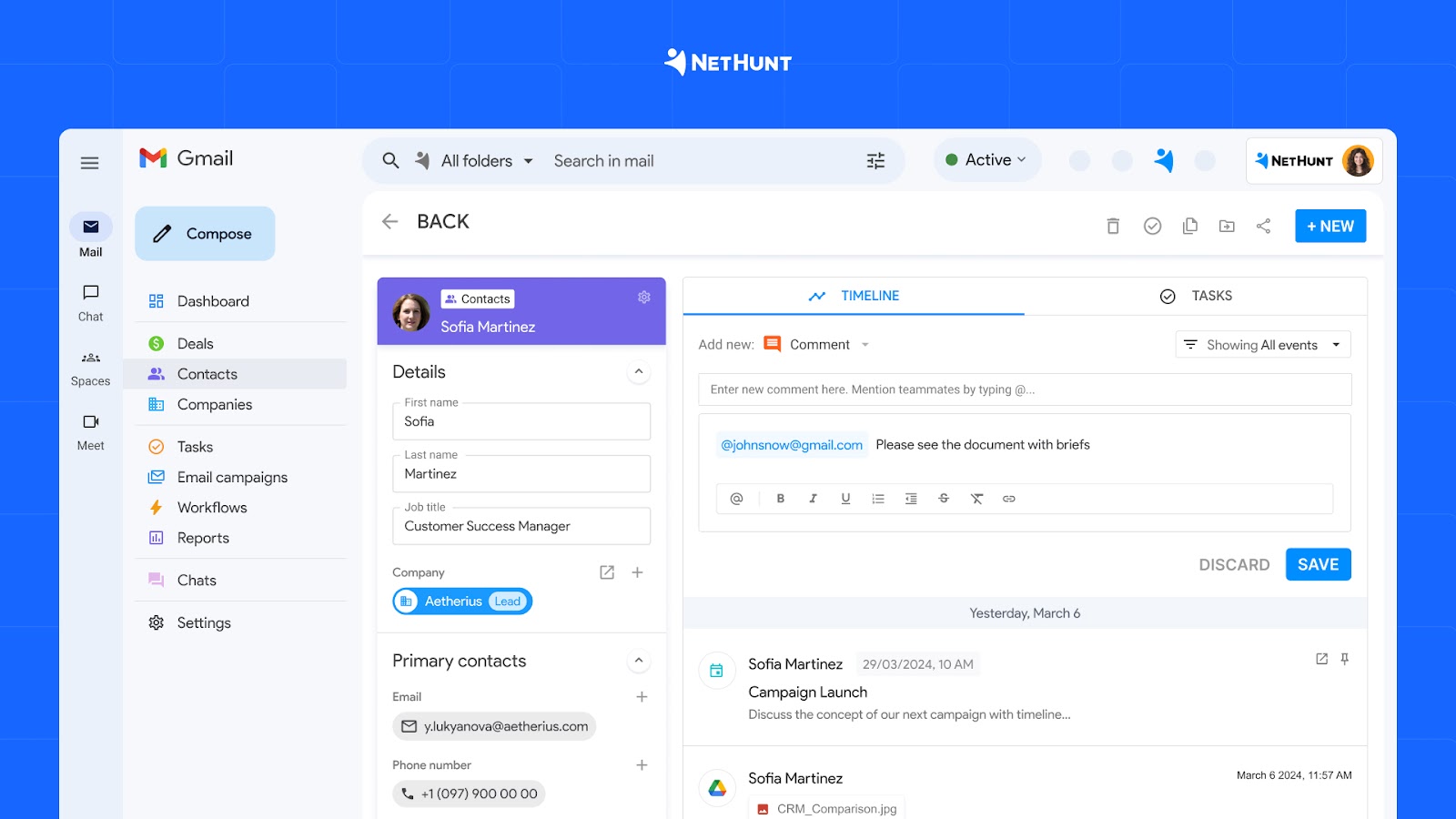
A lead management CRM is software that records a potential customer from the first inquiry through qualification and conversion. It stores contact data, source information, messages, tasks, ownership, deal stage, and activity history in one customer record. Automation can then assign the lead, trigger a response, create a task, or move the record when defined conditions are met.
Lead management is one part of customer relationship management. It concentrates on new prospects. A CRM usually continues to hold data after the sale, including account history, renewals, service conversations, and future opportunities.
Best lead management software at a glance: top 7 CRM tools
- NetHunt CRM — best overall for SMB sales teams managing leads across email, WhatsApp, Instagram, and other channels simultaneously
- HubSpot — best free CRM for lead management; ideal for teams starting out with marketing automation and inbound lead generation
- Salesforce Sales Cloud — best for large enterprises that need deep customization, complex lead routing, and advanced AI
- Pipedrive — best for sales teams that want a clean, visual pipeline without a steep learning curve
- Zoho CRM — best lead management system for small businesses that need solid automation at a low price
- Freshsales — best CRM for AI-powered lead scoring built into the daily sales workflow
- Monday CRM — best for teams that want a flexible workspace that doubles as a lead management tool
The right choice depends on your team size, where your leads come from, and how much you need to automate. Jump to the decision framework at the end to find your match.
What makes a great CRM lead management tool?
Not every CRM is designed with lead management as its primary use case. A tool that excels at contract management or customer support doesn't automatically handle the top of the funnel well.
The four capabilities that separate a genuine lead management system from a contact database are:
- Lead capture — leads should enter the CRM automatically from wherever they originate: web forms, email, live chat, social media, paid ads. Manual data entry is where lead data goes to get corrupted.
- Lead scoring — ranking prospects by interest level and buying readiness lets reps focus on the right people. Without scoring, high-volume pipelines become guesswork.
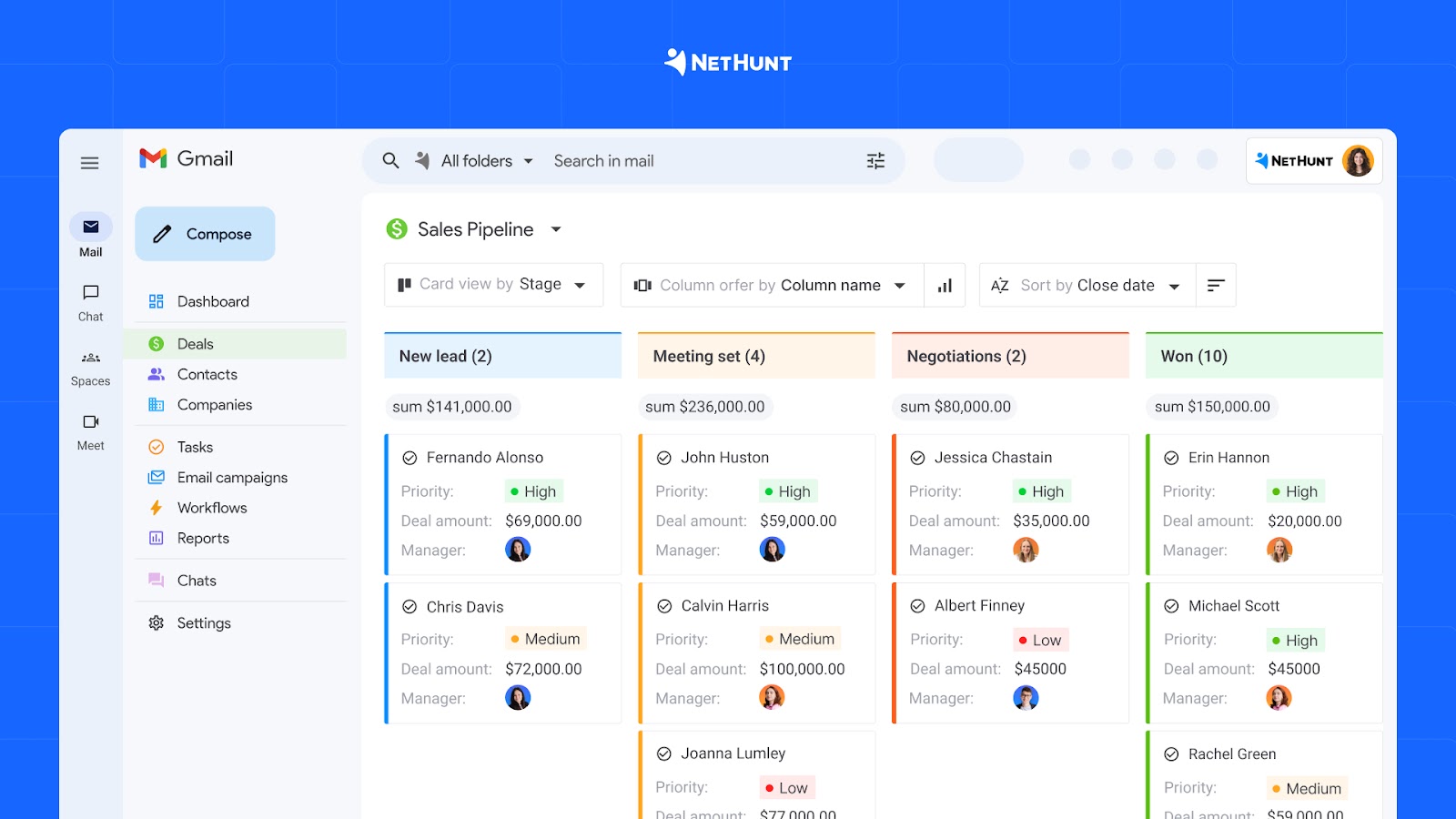
- Pipeline tracking — a visual pipeline with time-in-stage data shows where deals stall. The best CRMs surface this proactively rather than requiring managers to dig for it.
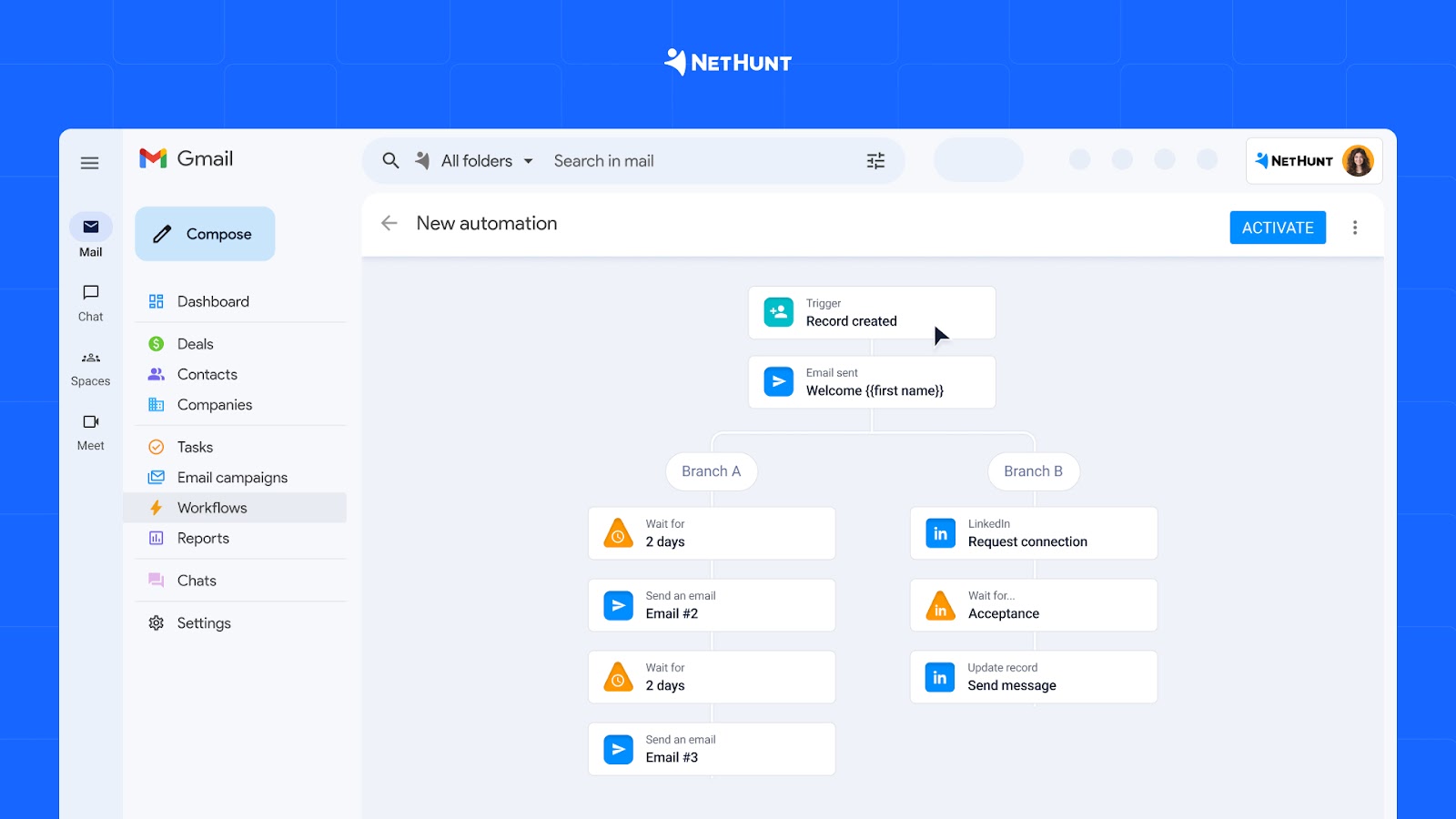
- Automation — follow-up emails, lead assignments, and stage changes should trigger automatically based on rules, not memory. This is the difference between a management tool and a system that actually manages.
We evaluated all seven tools against these four pillars plus four additional criteria: ease of use, multi-channel communication, reporting quality, and value for money.
How we evaluated these lead management tools
This is an editorial comparison of seven widely considered CRM products. We reviewed current vendor documentation, public pricing pages, integration information, product help content, and available trial or product materials in August 2026. Products were compared in eight areas:
- Lead capture & Integrations (0–10) — how many channels does it connect to natively, and how easy is setup?
- Pipeline Management (0–10) — visualisation quality, stage customisation, multiple pipelines, and sales pipeline tracking
- Automation & Workflows (0–10) — depth of no-code automation, workflow trigger options, and multi-step sequences
- Lead scoring & Qualification (0–10) — built-in scoring algorithms, custom rules, and tools to qualify leads
- Ease of Use & Setup (0–10) — time to first value, learning curve, and team adoption likelihood
- Multi-Channel Communication (0–10) — native support for email, WhatsApp, Instagram, Telegram, and other channels
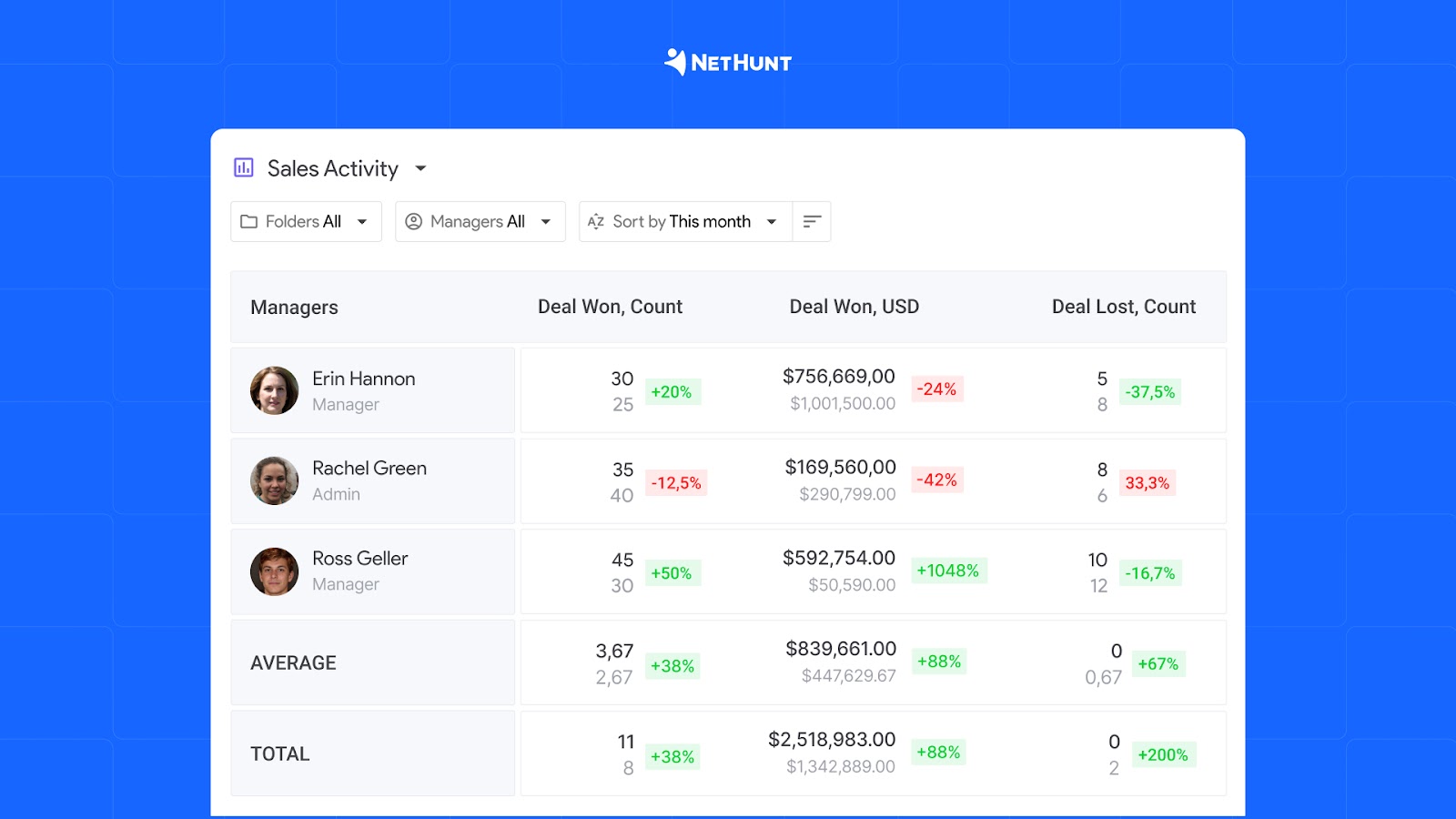
- Reporting & Analytics (0–10) — pipeline reports, sales rep performance, time-in-stage, and custom dashboards
- Value for Money (0–10) — feature depth relative to price, free plan availability, and scalability for small businesses and larger teams
We did not convert these factors into a single total. Their importance changes by business. A team that receives most inquiries in WhatsApp should weight channel capture more heavily than predictive scoring. An enterprise with several regions may care far more about territory rules, permissions, and auditability.
Best CRM for lead management: full comparison
Here is how all seven CRM tools score across our eight lead management criteria:
| CRM | Lead capture | Pipeline | Automation | Scoring | Ease of Use | Multi-channel | Reporting | Value | Total /80 | Best For |
|---|---|---|---|---|---|---|---|---|---|---|
| NetHunt CRM | 9 | 8 | 9 | 6 | 9 | 10 | 8 | 9 | 68 | Multi-channel SMB teams |
| HubSpot | 9 | 9 | 9 | 9 | 8 | 7 | 9 | 6 | 66 | Free starter CRM |
| Salesforce | 10 | 10 | 10 | 10 | 5 | 7 | 10 | 4 | 66 | Enterprise scale |
| Pipedrive | 7 | 10 | 7 | 7 | 9 | 6 | 8 | 8 | 62 | Visual deal tracking |
| Zoho CRM | 8 | 8 | 8 | 8 | 7 | 7 | 8 | 9 | 63 | Budget-conscious teams |
| Freshsales | 7 | 7 | 8 | 9 | 8 | 6 | 7 | 8 | 60 | AI-powered scoring |
| Monday CRM | 7 | 8 | 7 | 6 | 9 | 5 | 7 | 7 | 56 | Flexible workspaces |
The 7 best CRM tools for lead management in 2026
1. NetHunt CRM — best for multi-channel lead management
Score: 68/80 | Starting price: $24/user/month | Free trial: 14 days
NetHunt CRM is the strongest lead management option for SMB sales teams that generate leads across more than one channel simultaneously. Where most CRMs treat WhatsApp, Instagram, and Telegram as optional bolt-ons requiring third-party middleware, NetHunt connects to all three natively — every conversation is automatically logged, linked to a contact record, and available for follow-up automation the moment it arrives.
Setup takes hours, not days. NetHunt CRM lives inside Gmail as a Chrome extension, so sales reps work in an interface they already know. Web forms, email, Instagram, and messenger platforms connect via native integrations. Most teams are running their full lead management process end-to-end within a few days.
Records, messages, tasks, and deals remain attached to the customer history. Teams can build multiple pipelines, use custom fields, assign owners, and create workflows for lead distribution, follow-up, data updates, and multi-step communication. Advanced automation and some channel features require the relevant paid plan, so buyers should compare plans against their exact workflow.
NetHunt also provides an MCP server. Compatible AI tools, including ChatGPT, Claude, and Grok, can work with permitted CRM data through natural-language requests. Typical uses include finding records, reviewing activity, analyzing a pipeline, updating information, and creating tasks. The usefulness of any answer still depends on the quality and completeness of the CRM data.
Key features for lead management
- Omnichannel lead capture: Gmail, web forms, WhatsApp, Instagram, Facebook, Telegram, Viber
- Automated workflows with conditional logic, split paths, and wait steps to nurture leads at scale
- Multi-channel sequences: combine email marketing and messenger outreach in one automated flow
- Visual sales pipeline with custom stages, required fields, and multiple pipelines
- Data enrichment via Apollo and Hunter — qualify leads with verified contact data
- Pipeline and time-in-stage reports with period-over-period comparison
- MCP integration: manage leads and analyze your pipeline with ChatGPT, Claude, or Grok
- Gmail and Google Workspace native — no tab-switching, no context-switching
Pros
- Best-in-class multi-channel lead capture — no competitor in this list comes close
- No-code workflow automation that covers the entire lead management process
- AI/MCP integration is unique in the CRM lead management category
- Fast setup and low learning curve — designed for small teams and growing businesses
- Strong value for money relative to feature depth
Cons
- No native point-based lead scoring algorithm — lead qualification is manual
- No built-in landing page builder or marketing campaigns tool
Pricing
- Basic: $24/user/month
- Business: $48/user/month
- Advanced: $96/user/month
2. HubSpot — best free CRM for lead management and marketing automation
Score: 66/80 | Starting price: Free | Free plan: Yes (unlimited users)
HubSpot combines a CRM with marketing, sales, service, content, and data products. Its free tools provide a practical entry point for up to two users. Paid products add deeper automation, sequences, scoring, reporting, and campaign functions, although the total cost can rise as the team, contact database, product mix, and AI-credit use grow.
HubSpot’s main advantage for lead management is the connection between acquisition activity and the sales record. Form submissions, page activity, email engagement, meetings, and deal work can contribute to one view of the prospect.
Cost is the limiting factor. The free tier is real, but the automation, email sequences, lead rotation, and custom reporting that most growing sales teams need live behind paid plans. At Professional tier ($90/user/month), costs escalate fast. HubSpot makes most sense for teams who can grow into paid features gradually — or for marketing and sales teams that want one platform managing the entire funnel from first click to closed deal.
Key features for lead management
- Free CRM for 2 users
- Lead scoring based on behaviour, demographics, and engagement signals
- Email marketing tools and sequences for automated outreach and lead nurturing
- Landing page and form builder included in free and paid tiers
- Marketing automation software across six dedicated Hubs
- 1,900+ native integrations with popular CRM tools and marketing tools
Pros
- Best free plan in the CRM market — genuinely useful for small businesses
- Excellent lead scoring, marketing automation, and inbound lead management
- Huge integration ecosystem and strong onboarding resources
- All-in-one CRM: covers marketing, sales, and service in one platform
Cons
- Pricing scales sharply — advanced lead management features are expensive
- Multi-channel support (WhatsApp, Instagram) requires third-party integrations
- Can feel overwhelming for teams that only need basic lead management tools
Pricing
- Free CRM: $0 (2 users)
- Starter: $15/user/month
- Professional: $90/user/month
- Enterprise: $150/user/month
3. Salesforce Sales Cloud — best for enterprise lead management
Score: 66/80 | Starting price: $25/user/month | Free trial: 30 days
Salesforce is the benchmark for enterprise CRM software, and its lead management capabilities reflect that ambition. Lead capture, lead scoring, routing, and lead nurturing are all deeply configurable — the platform can model sales processes that would take months to replicate anywhere else. Einstein AI adds predictive lead scoring that surfaces the highest-priority prospects automatically, and the workflow automation engine can assign leads to the right sales rep based on territory, deal size, product interest, or any other custom rule.
The trade-off is complexity and cost. Salesforce requires dedicated admin resources to implement and maintain. For a small team of five or ten people managing a straightforward sales process, it is almost certainly overkill — and the true cost of Salesforce is often three to five times the base license price once you factor in implementation, training, and add-ons. But for organisations with 50+ users, complex multi-team sales processes, and customer relationship management needs that span multiple systems, Salesforce remains the gold standard of CRM systems.
Key features for lead management
- Advanced lead routing with territory management, assignment rules, and round-robin distribution
- Einstein AI: predictive lead scoring, opportunity insights, and next-best-action recommendations
- Deep customization via custom objects, flows, and a vast AppExchange ecosystem
- Enterprise-grade reporting and Salesforce Analytics for tracking the full sales pipeline
- Thousands of integrations — the largest ecosystem of any CRM tool on this list
Pros
- Most powerful lead management capabilities available in any CRM software
- AI-powered lead scoring and insights via Einstein — best in class for enterprise
- Scales to any team size, sales process complexity, or business needs
- Unmatched integration and partner ecosystem
Cons
- High implementation cost — requires dedicated admin and often an implementation partner
- Steep learning curve; low ease-of-use score hurts daily adoption
- Expensive — true cost often 3–5× the base price
- Overkill for small businesses or teams with simple lead management processes
Pricing
- Starter Suite: $25/user/month
- Pro Suite: $100/user/month
- Enterprise: $165/user/month
- Unlimited: $330/user/month
4. Pipedrive — best CRM for pipeline management and lead tracking
Score: 62/80 | Starting price: $14/user/month | Free trial: 14 days
Pipedrive was designed around one idea: salespeople should spend their time selling, not managing software. The result is a CRM tool that is genuinely intuitive, with visual pipeline management that gives any sales team an instant read on where every lead stands and what needs to happen next.
For teams with a straightforward sales process and manageable lead volume, Pipedrive delivers exactly what it promises. Lead tracking, contact management, deal progression, email sync, call logging, and basic automation all work cleanly without the complexity of larger platforms. Its drag-and-drop pipeline is one of the best in the market — and for a sales rep who lives in the pipeline view, that matters.
Where Pipedrive falls short for deeper lead management is depth and breadth. Multi-channel communication (WhatsApp, Instagram) requires third-party tools. Lead scoring is available but basic. The workflow automation engine, while improved in recent versions, cannot match HubSpot or NetHunt for complex multi-step lead nurturing sequences. If you need to streamline a high-volume lead management process across multiple channels, you will quickly hit its limits.
Key features for lead management
- Best-in-class visual Kanban pipeline for intuitive lead tracking and sales pipeline management
- Lead Inbox to separate unqualified prospects from active deals — helps qualify leads before they enter the pipeline
- Email sync and tracking with open and click notifications
- Basic workflow automation for follow-up reminders and stage changes
- Call tracking, logging, and built-in calling on higher tiers
- 400+ integrations via marketplace
Pros
- Easiest pipeline management in this category — ideal for visual thinkers
- Fast onboarding — most sales reps productive within hours
- Good value at entry-level pricing for small teams
- Clean, distraction-free interface that drives adoption
Cons
- Limited native multi-channel lead capture support
- Workflow automation less powerful than NetHunt or HubSpot for complex lead nurturing
- Marketing automation software requires additional integrations or add-ons
- Reporting is basic on lower tiers
Pricing
- Essential: $14/user/month
- Advanced: $29/user/month
- Professional: $59/user/month
- Power: $69/user/month
5. Zoho CRM — best lead management system for small businesses
Score: 63/80 | Starting price: $14/user/month | Free plan: Yes (up to 3 users)
Zoho CRM consistently delivers the most features per dollar in the CRM market, which makes it the go-to lead management system for small businesses and budget-conscious teams. For lead management specifically, it covers all the fundamentals — multi-channel lead capture, lead scoring, workflow automation, and segmentation — at a price point that undercuts most competitors.
The platform connects to social media, phone, email, and live chat natively. Zia, Zoho's built-in AI, predicts lead conversion likelihood, suggests the best time to contact a prospect, and can automate lead assignment based on scoring thresholds. The workflow automation handles multi-step sequences with conditions, delays, and assign rules — and the free plan for up to 3 users makes Zoho CRM accessible to the smallest teams.
The main criticism is the user experience. Zoho CRM's interface feels denser than Pipedrive or HubSpot, and the volume of configuration options can slow down initial setup. Teams that invest time in setup get strong management capabilities; teams that want instant simplicity may find it frustrating. For teams already using Zoho for project management, email marketing tools, or other business management platform needs, the integration depth is a genuine advantage.
Key features for lead management
- Lead capture from web forms, social media, email, and phone — all in one lead management system
- Zia AI: lead scoring, conversion predictions, and best-time-to-contact recommendations
- Workflow automation with multi-step rules, conditions, and automatic lead assignment
- SalesSignals: real-time lead tracking notifications across all channels
- Free plan for up to 3 users — best free CRM software option for micro-teams
- Deep integration with the Zoho ecosystem: projects, email marketing, analytics, and more
Pros
- Best price-to-feature ratio in this list — ideal for small businesses
- Strong AI lead scoring via Zia at a fraction of Salesforce's price
- Free plan covers basic lead management for micro-teams
- Wide range of native integrations including popular marketing tools
Cons
- Interface feels dated and dense compared to newer CRM tools
- Requires more setup time than competitors designed for small teams
- Support quality is inconsistent — best practices suggest self-service documentation
Pricing
- Free: $0 (up to 3 users)
- Standard: $14/user/month
- Professional: $23/user/month
- Enterprise: $40/user/month
6. Freshsales — best CRM for AI-powered lead scoring and automation
Score: 60/80 | Starting price: $9/user/month | Free plan: Yes
Freshsales by Freshworks is a clean, modern CRM software with one strong differentiator in the lead management space: Freddy AI. The built-in AI scores leads automatically, surfaces insights about deal health, suggests next best actions for each sales rep, and predicts which leads are most likely to close. For sales teams that struggle to qualify leads and prioritize a large pipeline, this is genuinely useful — and it is built directly into the CRM rather than available as an expensive add-on.
The interface is one of the most polished in this category. Setup is fast, adoption is high, and the free plan is usable for very small teams. Paid plans remain affordable compared to HubSpot or Salesforce, making Freshsales a strong option for growing teams that want AI-powered lead management without the enterprise price tag.
The weakness is depth outside of AI scoring. Freshsales's workflow automation is solid but less flexible than NetHunt's Workflows for complex lead nurturing sequences. Multi-channel support is limited — if you need to capture leads from WhatsApp or Instagram natively, you will need additional integrations. And the ecosystem, while growing, is smaller than the market leaders.
Key features for lead management
- Freddy AI: automated lead scoring, deal health insights, and next-best-action recommendations
- Built-in phone, email, and chat — all communication logged to the lead record automatically
- Visual deal pipeline with drag-and-drop stage management
- Contact and account data enrichment via built-in sources
- Sales sequences to automate outreach and follow-up for each sales rep
- Free plan with contact management, pipeline management, and basic lead tracking
Pros
- Best native AI lead scoring at this price point — outperforms Zoho CRM's Zia for scoring accuracy
- Very clean interface — fastest to learn and adopt of all CRM tools in this list
- Built-in calling on all paid plans — no third-party integration needed
- Strong value for money; free CRM software tier available
Cons
- Workflow automation less flexible than NetHunt or HubSpot for complex lead management processes
- Limited native messenger integrations for multi-channel lead capture
- Smaller integration ecosystem than Salesforce or HubSpot
Pricing
- Free: $0
- Growth: $9/user/month
- Pro: $39/user/month
- Enterprise: $59/user/month
7. Monday CRM — best for teams that want a flexible workspace
Score: 56/80 | Starting price: $12/user/month | Free plan: Yes (2 seats)
Monday CRM is not a traditional CRM software — it is a highly flexible business management platform that can be configured to handle lead management, project management, task management, and operations in one workspace. Teams already using Monday.com often find it natural to extend it into lead tracking rather than adopting a separate tool.
The platform is visually strong and deeply customisable. You can build a lead pipeline that looks exactly how your sales process requires. Automation recipes handle routine tasks — lead assignment, status changes, follow-up reminders — and the interface is one of the most intuitive in this list. If you want a management tool that covers leads and projects without switching between applications, Monday CRM is worth considering.
The limitation is CRM specialisation. Monday CRM lacks the dedicated lead management capabilities of purpose-built tools: there is no native lead scoring, limited email marketing features without integrations, and capturing leads from WhatsApp or Instagram requires connecting third-party apps. For teams whose primary work is lead management and sales, it is not the most efficient choice. For teams that also manage client projects, internal operations, and sales all in one place, it can be the right CRM.
Key features for lead management
- Highly customisable boards and pipeline views for flexible lead tracking
- Automation recipes for lead assignment, follow-up reminders, and status changes
- Email integration and tracking on paid plans
- Cross-board reporting dashboards for sales and marketing teams
- Strong collaboration and task management tools built in
- 200+ native integrations with popular marketing tools and CRM systems
Pros
- Most flexible and customisable workspace — designed for teams with diverse business needs
- Excellent for teams that manage leads alongside projects and operations
- Intuitive drag-and-drop interface with strong visual design
- Free plan available for very small teams (2 seats)
Cons
- Not a purpose-built lead management CRM — missing dedicated scoring, enrichment, and automation depth
- Email marketing and sales automation capabilities lag behind dedicated CRM tools
- Multi-channel lead capture (WhatsApp, Instagram) requires third-party integrations
- Can get expensive as team size grows
Pricing
- Free: $0 (2 seats)
- Basic: $12/user/month
- Standard: $14/user/month
- Pro: $24/user/month
CRM lead management software: pricing overview
| CRM | Starting Price | Free Plan? | Trial |
|---|---|---|---|
| NetHunt CRM | $24/user/mo | ❌ | 14-day free trial |
| HubSpot | $0 (Free CRM for 2 users) | ✅ | Free forever |
| Salesforce | $25/user/mo | ❌ | 30-day trial |
| Pipedrive | $14/user/mo | ❌ | 14-day trial |
| Zoho CRM | $14/user/mo | ✅ (up to 3 users) | 15-day trial |
| Freshsales | $9/user/mo | ✅ | 21-day trial |
| Monday CRM | $12/user/mo | ✅ (2 seats) | 14-day trial |
All prices are per user per month, billed annually. Verify current pricing on each vendor's website before purchasing.
How to choose the right lead management CRM
The right CRM depends on three things: your team size, where your leads come from, and how complex your sales process is. Here is a practical framework to find the best CRM for your specific situation.
- Small teams (1–10 people). Start with HubSpot's free plan if your leads come primarily from inbound channels — content, paid ads, SEO. For simple pipeline tracking with minimal configuration, Pipedrive gets sales reps productive faster than anything else in this list. If you're already managing leads across WhatsApp, Instagram, or other messengers, those two tools aren't the right fit — NetHunt is designed specifically for multi-channel SMB teams and will save the most time from day one.
- Growing teams (10–50 people). NetHunt CRM is the strongest option here. Omnichannel lead capture and no-code automation let a growing team handle increasing lead volume without adding headcount. Zoho CRM is a viable alternative if messenger integrations aren't a priority and budget is the primary constraint.
- Enterprise teams (50+ people). Salesforce. Its customization depth, enterprise security, and integration ecosystem genuinely justify the cost at scale. Budget realistically: implementation, admin resources, and add-ons typically add significantly to the base license cost.
- When AI lead scoring matters. If prioritizing a large pipeline at scale is the core problem, Freshsales (Freddy AI) and Salesforce (Einstein AI) offer the most sophisticated built-in scoring. HubSpot's behavior-based scoring is strong for inbound flows. NetHunt and Pipedrive don't have a native scoring algorithm, but NetHunt users routinely replicate qualification logic through workflow automation — assigning scores via custom fields, triggering stage changes based on lead behavior, and routing prospects automatically once they hit defined criteria. It's not algorithmic scoring out of the box, but for teams with a well-defined ICP it gets close.
- When AI tool integration matters. Several CRMs in this comparison support MCP (Model Context Protocol), including Salesforce and HubSpot through their developer ecosystems. NetHunt's implementation stands out for SMB teams specifically because it requires no developer setup — reps can query pipeline data, update records, and get deal summaries in plain language inside ChatGPT or Claude without writing a line of configuration. For teams that have already built AI into their daily workflow but don't have a RevOps or engineering function to maintain integrations, that low-friction setup is the meaningful difference.
- Best software for marketing and inbound lead nurturing. HubSpot's Marketing Hub is purpose-built for inbound lead nurturing — landing pages, forms, lead scoring based on content engagement, and marketing and sales team handoffs are all native. It is the strongest all-in-one option if marketing campaigns and content are your primary lead sources. For email marketing tools combined with CRM, HubSpot and NetHunt are the top choices.
- Best free CRM lead management software on a budget. Zoho CRM delivers the most features per dollar and its free plan covers the lead management process for up to 3 users. Freshsales at $9/user/month is the best value for teams that prioritise AI lead scoring. HubSpot's free CRM is the best free crm lead management software for teams with inbound lead flow. Improving lead quality at the top of your funnel is the fastest way to close more deals without increasing headcount. All three can close more deals without a large software budget.
FAQ: CRM for lead management
What is the best CRM for lead management?
There is no single best CRM for lead management — the right choice depends on your team size and lead sources. NetHunt CRM is the strongest all-around option for SMB sales teams managing leads across multiple channels. HubSpot is the best free CRM starting point for inbound-focused teams. Salesforce is the best choice for enterprise teams with complex sales processes. See the decision framework above for a more specific recommendation.
What features should a lead management system have?
A strong lead management system needs: automatic lead capture from your main channels, a visual sales pipeline to track stage progression, workflow automation for follow-ups and lead assignment, lead scoring to qualify leads by readiness to buy, and reporting to measure conversion rates and track leads across your sales pipeline. Contact management and CRM integration with your existing marketing tools round out a complete setup.
How does CRM lead management work?
CRM lead management works by automatically capturing leads from multiple sources — web forms, email, social media, ads — then tracking each lead through a defined pipeline from first contact to close. The CRM assigns leads to sales reps, triggers follow-up actions based on rules, and records every interaction so nothing gets missed. Reporting shows where leads convert and where they drop off.
Is HubSpot good for lead management and email marketing?
Yes — HubSpot is particularly strong for teams combining lead management with email marketing and marketing automation. The free CRM includes email marketing tools, contact management, and a basic pipeline. Paid tiers add lead scoring, advanced automation software, and email sequences. The limitation is cost: meaningful lead management automation lives behind paid plans that scale quickly for growing sales and marketing teams.
Which CRM is best for managing leads from WhatsApp and Instagram?
NetHunt CRM is the strongest option for teams that capture leads from WhatsApp and Instagram. It connects natively to both channels — conversations are logged automatically to contact records and can trigger follow-up workflows without any manual input. Most other CRMs in this comparison require third-party integrations to achieve the same result.
What is the difference between lead management and CRM?
A CRM (customer relationship management system) manages the full customer lifecycle from first contact to ongoing relationship. Lead management focuses specifically on the top of that funnel: capturing, qualifying, nurturing, and converting prospects before they become customers. Most modern CRM software includes lead management as a core function, but some CRM tools are better optimised for it than others. The best lead management software treats these as a single integrated process rather than separate systems.
Which CRM is best for small business lead management in 2026?
For small businesses in 2026, the top options are NetHunt CRM (if you manage leads across multiple channels and use Gmail), HubSpot (if you want a free plan with room to grow your marketing automation capabilities), or Pipedrive (if you want the simplest possible pipeline management tool). All three are designed for small team use, require no technical expertise to set up, and deliver value from day one. Zoho CRM is the best option if budget is the primary constraint.
product experts — let's find the best setup for your team